Field Guide to Digital Video/IP Networks: ask the expert
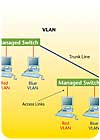
VLANs can be used to segregate devices connected to the same network switches. VLANs are often designated by color, such as the "Blue" and the "Red" VLANs pictured above.
VLANs and Subnets
How can I separate IP security devices from enterprise users on a shared network?When considering an installation where IP security cameras, access control, intercom and other devices will be connected to the same network switches as enterprise users, security integrators should carefully consider how to protect the security devices from potential attack by the “inside” personnel in the client’s organization. It is a known fact that successful network hacking by insiders causes much more damage to businesses than outside hacker activity, as the insiders are typically behind any firewalls, therefore they have much greater freedom to perform their nefarious deeds. And the installation of a new networked security solution is a golden opportunity for insider mischief.
There are two common methods for separating devices that are electrically connected to the same network switches. The first is the use of one of the subnet masks, which is a programmable entry into a device on a network, which tells that device that it can only talk to other addresses within its own sub-group.
For example, if a device is programmed with the local IP address of 192.168.2.80 with a subnet mask of 255.255.255.192, that device will only communicate with other devices within the address range from 192.168.2.64 to 192.168.2.127. By using subnets, security devices can be logically segregated into a specific address group, while enterprise users can be addressed so that they cannot communicate with the security devices on the network.
A more flexible method of segregating devices is the use of VLAN (Virtual Local Area Network) technology. Supported by most high-end switch vendors, VLANs can be set up so that devices can be grouped to allow communications, while segregating them from other devices on the network.
Because they provide a variety of programmable options, VLAN segregation is preferred to the older technology of subnet masking.
How to Overcome IT Reluctance to Allow Security Video on a Network
How can I develop a better relationship with IT personnel when it comes to their concerns about installing a video surveillance system on their network?IT personnel are rightfully concerned about the introduction of security video onto their networks, as a typical video application will place one (or many) constant video streams onto the devices and cabling that are already carrying all of the enterprise data traffic, and increasingly VoIP telephone communications. Video can use a large portion of the available bandwidth, and may slow down or disrupt enterprise data communications.
One way to assuage an IT person’s concerns is to provide them with an IP network camera of the type that the security integrator is proposing to use on the specific installation. By supplying the IT person with a camera, stand, lens, power supply, and viewing software, the IT person can then test and see for himself the impact of a video stream from that type of device on the network.
IT departments use either simple or sophisticated network monitoring software that can show them graphically how the video stream affects their network. Many security integrators will bring a camera or encoder to a potential client’s IT department, set it up for them, and let them test it for a week or two. By putting the product into their hands, IT personnel can become comfortable with the application of security video on their specific network.
Pre-Program Devices before Installing them at the Job Site
I’ve heard that an entire IP-based video surveillance system should be set up in advance of the actual installation.IP-enabled security devices can and should be programmed at the security integrator’s office prior to in-stalling them at a client’s location. By setting up the various encoders, IP cameras, and other devices onto a standard network switch using UTP jumpers, the complete system can be programmed and tested, including viewing and recording software, if applicable.
If placing devices on an enterprise network, the IP addresses, subnet masks, default gateway addresses, and ports for the security devices should be obtained from the client’s IT department prior to the installation date. Once the devices have been properly addressed, they can be labeled with their IP address and the physical location where each is to be installed.
Use Demonstrations to Manage Clients' Expectations
Why do customers sometimes seem disappointed once they actually see the results of a network-based video security system?The proliferation of HDTV, crystal-clear flat screen televisions, and other high-tech entertainment video options has created a new concept of what video is. It’s important that security integrators demonstrate to their clients the realities of networked security video in terms of frames per second and image quality during the sales process, so that customers are not disappointed when they view video over a completed security system installation.
While 30 frames per second is the NTSC video standard, to conserve network bandwidth many security video feeds will be set at 15 or even 7.5 fps. And a typical DSL or cable modem ISP connection may provide as little as 3 to 5 fps to a remote location over the Internet.
Many security integrators have installed DVRs or network cameras at their own offices and connected them to the Internet to allow their salespeople to demonstrate the products right on a client’s own Internet-connected PC. If using this approach it’s best to aim the cameras at the street to show the movement of vehicles in the received video.
Another demonstration method is to use one of the many available network video devices currently connected to the Internet by manufacturers and distributors for this important demonstration process.
Looking for a reprint of this article?
From high-res PDFs to custom plaques, order your copy today!



