SDMmag logo
search
Go to Ask SDM AI
cart
facebook twitter linkedin youtube
  • Sign In
  • Create Account
  • Sign Out
  • My Account
SDMmag logo
  • NEWS
  • PRODUCTS
  • TOPICS
    • Access Control & Identification
    • Integration & Network Solutions
    • Life Safety & Fire Alarm
    • Monitoring
    • Smart Home
    • Trends & Industry Issues
    • Video Solutions
  • COLUMNS
    • Digital Shuffle
    • Editor's Angle
    • Insider News & Business
    • Integration Spotlight
    • Marketing Madmen
    • Security & the Law
    • Security Comings & Goings
    • Security Networkings
    • Technology @ Work
    • Technology Solutions & Skills
    • SIA Waypoints
    • Cybersecurity Chronicle
  • EXCLUSIVES
    • Annual Industry Forecast
    • Dealer of the Year
    • Project of the Year
    • SDM 100
    • State of the Market Series
    • Systems Integrator of the Year
    • Top Systems Integrator Report
    • TMA Excellence Awards
  • BLOG
  • MEDIA
    • Videos
    • Podcasts
    • Polls
    • White Papers
  • EVENTS
    • Industry Calendar
    • Webinars
  • MORE
    • Classified Ads
    • Newsletters
    • SDM Store
    • State of Security eBook
    • Sponsored Insights
  • BUYERS GUIDE
    • Buyers Guide
    • Take a Tour
  • EMAG
    • eMagazine
    • Archive Issues
    • Monitoring Today
    • Advertise
  • SIGN UP!
Security NetWorkings

IP Addressing Technologies
By David Engebretson
February 1, 2005
Gateway routers can be programmed to provide Network Address Translation (NAT), which can direct requests from the Internet to an IP camera or video server.

Many of today’s electronic security systems are designed to operate on a communications/computer network. SDM NetWorkings can help you understand both the intricacies of communication networks, as well as how security systems fit into the networked world. It features excerpts from the “Technician’s Guide to Networking for Security Systems,” a forthcoming book written by SDM’s contributing technology editor, Dave Engebretson. Visit www.SecurityNetworkingInstitute.com for ordering information.

Because there are many different types of equipment and networks, there are a variety of different technologies used to provide IP addressing for network devices. This month’s column will explain these addressing options and also the terms and concepts related to IP and Internet addressing.

Any computer or IP-addressed device on a network can be called a host. A host can be called by its IP address, or can be given a name, such as “NetCam 2” or “Dave’s Computer.”

Servers are computers that store and allow access to specific programs or services. Larger companies may have e-mail, database, or other types of servers for specific functions. Other users on the network can be allowed access to some or all of a certain server’s information or programs. Servers are used to concentrate data and programs, providing easier maintenance and control of computer services.

Static IP assigns a specific IP address to a specific device. These addresses typically aren’t changed very often, hence the name “static.” New devices added to the network will need to have a compatible address programmed, and the network administrator will need to keep careful track of which devices have which particular addresses to prevent assigning the same address to multiple devices. Static IP is often used in smaller networks that do not often have devices added to them.

In many networks, there are temporary users such as outside salespeople or corporate management who wish to connect their laptop to the LAN when they visit an office location. Dynamic Host Configuration Protocol (DHCP) is an addressing program, provided automatically by a network router or gateway, which provides temporary IP addresses to network computers or devices that request them.

To set up DHCP, network administrators can select a number of options, based on the sophistication of their DHCP-equipped router or network gateway. Options include how many DHCP addresses will be issued at one time, what the range of addresses will be, how long each address will be active (DHCP Lease), and other security options.

Using DHCP greatly reduces connection difficulties for temporary users, and for networks that are often changing and/or adding computers. When DHCP is enabled, users can simply set their computers to accept an IP address, without contacting the system administrator. Windows users can simply select DHCP in the “Internet Protocol (TCP/IP) Properties” window associated with the particular NIC or Wi-Fi connection to be used, and the network does the rest.

Looking for quick answers on security topics? Try Ask SDM, our new smart AI search tool. Ask SDM →

DHCP is often used by Internet Service Providers (ISPs) to provide addresses for DSL and cable modem adapters.

Gateway routers provide a method of masking the existence of LAN-connected computers and devices to the Internet. For example, when a computer on a LAN makes a request for a web page the router uses its own WAN address to make the request, masking the address of the individual computer. This firewall function helps protect individual computers from outside hacking or compromise.

However, there are instances where it is desirable for LAN-connected devices to be accessible from the Internet, as is the case for a network camera or video server that your client may wish to view from a remote location. How can the gateway router provide for such remote access, without broadcasting the internal IP addresses of LAN-connected devices?

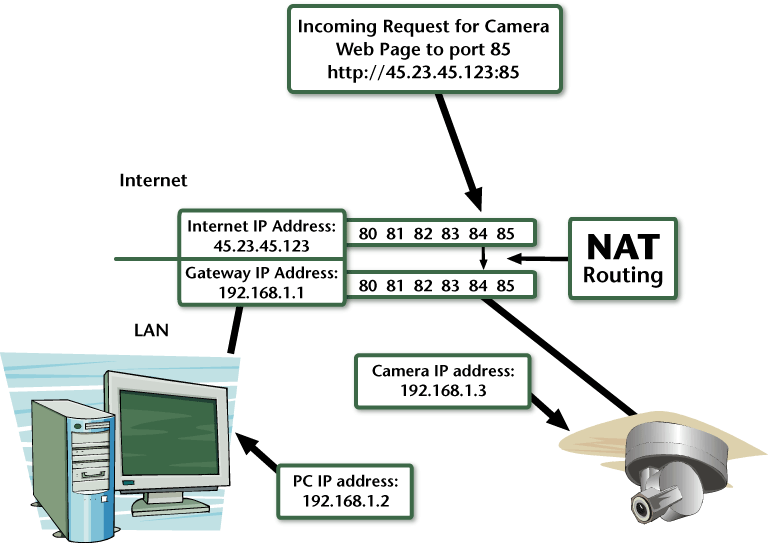
Network Address Translation (NAT) can be programmed to provide a path for incoming Internet communications, through the gateway router, to designated LAN-connected devices.

NAT uses TCP/IP ports, which can be imagined as the different channels on a cable or satellite television system. In this example, a single cable may be connected to a television, yet it provides potentially hundreds of separate channels for viewing. What channels are available for your viewing depends on which channels have been turned on by the cable provider for your location and cable interface box.

TCP/IP ports function in a similar manner. There are thousands of available ports, with numbers ranging from 0 to 65536. Ports numbered 1024 and below are most commonly used. Some port usage is standardized, with web traffic coming to port 80 and e-mail to port 25. Ports are used to direct communications traffic through the gateway router as seen in the diagram on page 68.

In this example, the camera has been programmed to respond to communications on port 85. When an Internet user outside of the LAN wants to connect to the camera, he inputs the WAN IP address of the gateway router, 45.23.45.123, adding the suffix “: 85.” The router has been programmed to translate Internet communication requests addressed to port 85 to the LAN IP address 192.168.1.3.

Once the port address has been programmed or changed in a device, typically that device will respond only to requests from other local LAN computers that also include the specific port address. In the above example, if the camera had been left at its default port, 80, it would respond to a communications request addressed “192.168.1.3” from another computer on the LAN. If the port address has been changed, as in the example above, other computers on the LAN would have to use “192.168.1.3:85” to reach the camera.

Share This Story

Looking for a reprint of this article?
From high-res PDFs to custom plaques, order your copy today!

Dave Engebretson is the president of Slayton Solutions Ltd., which provides fiber optic, IP networking, and cable termination and testing training for our industry. Catch his speeches at the ADI Expo in your area and win a prize if you can identify the 1970s era rock song that is his ringtone. See his work at slaytonsolutionsltd.com.

Recommended Content

JOIN TODAY
to unlock your recommendations.

Already have an account? Sign In

  • SDM 100

    SDM 100: Top 100 Security Dealers of 2026

    The top 100 security dealers navigated a complex...
    Exclusives
    By: Karyn Hodgson
  • Security camera

    State of the Market: Video Surveillance

    As video surveillance shifts from siloed systems to...
    Exclusives
    By: Brianna Wilson
  • 2026 Industry Forecast

    SDM 2026 INDUSTRY FORECAST

    Rapid technology advances meet shifting economic...
    Trends & Industry Issues
    By: Karyn Hodgson
Manage My Account
  • SDM Newsletters
  • Online Registration
  • eMagazine Subscriptions
  • Subscription Customer Service
  • Manage My Preferences

More Videos

Sponsored Content

Sponsored Content is a special paid section where industry companies provide high quality, objective, non-commercial content around topics of interest to the SDM audience. All Sponsored Content is supplied by the advertising company and any opinions expressed in this article are those of the author and not necessarily reflect the views of SDM or its parent company, BNP Media. Interested in participating in our Sponsored Content section? Contact your local rep!

close
  • Doctor examining child patient with mother present in medical clinic
    Sponsored byHID

    The Human Side of Hospital Security: How Modern Visitor Management Protects People First

Popular Stories

Video surveillance camera

Why Video Health Monitoring Is a ‘No Brainer’

ESA Board of Directors Q2 26 Elections

Electronic Security Association Announces 2026 Board of Directors Election Results

TMA & SDM Logos

Becklar, Elite & Puget Win 2026 TMA/SDM Monitoring Center Excellence Awards

SDM Dealer of the Year 2026 Promotion

Poll

What’s the most promising trend in the industry?

What’s the most promising trend in the industry?
View Results Poll Archive

Products

Physical Security Assessment Handbook An Insider’s Guide to Securing a Business

Physical Security Assessment Handbook An Insider’s Guide to Securing a Business

See More Products
SDM 100 2026 Rankings

Related Articles

  • How to Manage IP Addressing

    See More
  • Video Compression Technologies

    See More
  • Smartvid.io graphic 6920

    New Technologies Equal Opportunities

    See More
×

Be in the forefront of security intelligence when you receive SDM.

Join over 10,000+ professionals when you subscribe today.

SIGN UP TODAY!
  • RESOURCES
    • Advertise
    • Contact Us
    • Directories
    • Store
    • Want More
  • SIGN UP TODAY
    • Create Account
    • eMagazine
    • Newsletter
    • Customer Service
    • Manage Preferences
  • SERVICES
    • Marketing Services
    • Reprints
    • Market Research
    • List Rental
    • Survey/Respondent Access
  • STAY CONNECTED
    • LinkedIn
    • Facebook
    • YouTube
    • X (Twitter)
  • PRIVACY
    • PRIVACY POLICY
    • TERMS & CONDITIONS
    • DO NOT SELL MY PERSONAL INFORMATION
    • PRIVACY REQUEST
    • ACCESSIBILITY

Copyright ©2026. All Rights Reserved BNP Media, Inc. and BNP Media II, LLC.

Design, CMS, Hosting & Web Development :: ePublishing