Analog/IP NVR Integrates Successfully - This NVR Gets it Right

Most video surveillance systems use a boxed device or appliance to perform the tasks of video recording, playback and other user interfacing functions. These DVRs and NVRs often are limited in terms of how many cameras can be connected, and if they record IP video streams, which types of network cameras are supported.
Although it is easy for specific manufacturers to recommend the “forklift upgrade,” where all current video devices are replaced with that vendor’s products, this scenario does not reflect the real world. Many customers have extensive investments in their existing analog CCTV systems and cannot or will not pay to have their entire system reinstalled.
The new VR-N900U from JVC shows that this manufacturer has thought about the real world and built into this analog/IP NVR the features that many customers need. While providing many of the traditional functions and control features of a DVR, the VR-N900U includes powerful networking capabilities.
It will auto-detect IP cameras connected to the network and can be programmed to set the IP addressing information in the remote devices. This can make programming new IP cameras a snap.
The DVR-like user interface means that the VR-N900U can be used as a stand-alone device — no computer is necessary to view live or recorded video or to manipulate the system. Multiple IP camera streams, both MPEG-4 and motion JPEG, can be recorded and viewed.
All of this capability allows this device to be used as the centerpiece of a parallel-networked IP video security system. By locating the VR-N900U in a telecom closet, and connecting it to a small network switch (or VLAN connections on the enterprise switch), remote IP and analog cameras can be separately cabled into the NVR, and the primary IT concerns of bandwidth usage and network security can be readily assuaged.
Most industry manufacturers devices do not play well with others. Usually, vendor X’s IP cameras can only be viewed and recorded by vendor X’s NVR appliance.
This device will support IP cameras from multiple vendors as well as most PTZ analog formats. Also, Milestone XProtect connectivity is included. This software allows for multiple servers, sites, and hundreds of cameras to be viewed, recorded and manipulated.
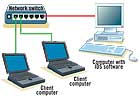
Client computer’s data is “mirrored” to the switch port connected to the communications IDS computer.
What’s an IDS?
The problems of securing data networks are constantly changing and growing, as three forces converge: the value of network data becomes more important, more machines and users (local and remote) are added to networks, and attackers become more sophisticated in their approaches.IT administrators need to be able to monitor the various types of activities on their networks.
The installation of an IDS (intrusion detection system) is a common network defense. IDS software is installed in computers, which are connected at particular points on a network.
The IDS software is programmed to monitor data traffic, looking for specific types of packets or communications that may indicate either hacker activity or the unauthorized transference of data files. Remember that the data leaving a network is a major concern, as the client’s intellectual assets and business information may be flying out of the LAN to a competitor or system hacker.
So the IDS system needs to receive and review data traffic going into and out of specific points in the network. This is typically accomplished using “port mirroring,” where network switches, which usually only send packets to the machines to which the data is addressed, can be programmed to send all traffic going through specific hardware ports to another one, which is then connected to the IDS computer.
How does IDS affect IP physical security installations? If IP-enabled security devices are monitored by an IDS, security integrators must check with the IT department to ensure that normal network communications between authorized users and physical security devices does not trigger the false alarms from the IDS.
Looking for a reprint of this article?
From high-res PDFs to custom plaques, order your copy today!



