SDMmag logo
search
Go to Ask SDM AI
cart
facebook twitter linkedin youtube
  • Sign In
  • Create Account
  • Sign Out
  • My Account
SDMmag logo
  • NEWS
  • PRODUCTS
  • TOPICS
    • Access Control & Identification
    • Integration & Network Solutions
    • Life Safety & Fire Alarm
    • Monitoring
    • Smart Home
    • Trends & Industry Issues
    • Video Solutions
  • COLUMNS
    • Digital Shuffle
    • Editor's Angle
    • Insider News & Business
    • Integration Spotlight
    • Marketing Madmen
    • Security & the Law
    • Security Comings & Goings
    • Security Networkings
    • Technology @ Work
    • Technology Solutions & Skills
    • SIA Waypoints
    • Cybersecurity Chronicle
  • EXCLUSIVES
    • Annual Industry Forecast
    • Dealer of the Year
    • Project of the Year
    • SDM 100
    • State of the Market Series
    • Systems Integrator of the Year
    • Top Systems Integrator Report
    • TMA Excellence Awards
  • BLOG
  • MEDIA
    • Videos
    • Podcasts
    • Polls
    • White Papers
  • EVENTS
    • Industry Calendar
    • Webinars
  • MORE
    • Classified Ads
    • Newsletters
    • SDM Store
    • State of Security eBook
    • Sponsored Insights
  • BUYERS GUIDE
    • Buyers Guide
    • Take a Tour
  • EMAG
    • eMagazine
    • Archive Issues
    • Monitoring Today
    • Advertise
  • SIGN UP!

Achieving a Smart Access Design

March 1, 2005

The use of computers has allowed access control systems to grow in features and complexity. Despite a centralized approach, a failure of the main computer will not bring the entire system to a halt. This is accomplished by distributing the data to local controllers that can continue to allow or deny access. Check your knowledge of access control technology by taking the following quiz.

1. Access control software can be run from only one computer.

a. True

b. False

2. Door access can be allowed or denied based upon the:

a. time of day.

b. specific door.

c. day of year.

d. Any of the above

e. None of the above

3. Access software can be accessed over a:

a. LAN.

b. standard POTS line.

c. Internet.

d. Any of the above

Looking for quick answers on security topics? Try Ask SDM, our new smart AI search tool. Ask SDM →

e. None of the above

4. Which operating system is required to run access control software?

a. Windows 98

b. Windows 2000

c. Windows XP

d. Depends upon the software

5. All access readers in a system must be the same type.

a. True

b. False

6. Activity reports can be generated based upon:

a. doors.

b. employee name.

c. date and time.

d. type of activity.

e. Any of the above

7. If a card is valid on one reader, then it also will be valid on all readers in the system.

a. True

b. False

8. You cannot mix fingerprint and retina biometric readers within a single system.

a. True

b. False

9. Smart cards can utilize which reader type?

a. Contact

b. Contactless

c. Combination contact and contactless

d. All of the above

10. All biometric readers require a dedicated enrollment reader.

a. True

b. False

11. Which of the following reader technologies can be incorporated on a smart card?

a. Standard proximity

b. Wiegand

c. Bar code

d. Any of the above

e. None of the above

12. All smart cards have the same memory capacity.

a. True

b. False

13. Integrating access with alarm or elevator control can only be accomplished by using output relays.

a. True

b. False

14. Access control software can include an integrated Photo ID software package.

a. True

b. False

15. Which of the following would be included for a typical door with a magnetic lock?

a. Access reader

b. Request-to-exit device

c. Emergency fire alarm override

d. All of the above

e. None of the above
What’s Wrong with This?

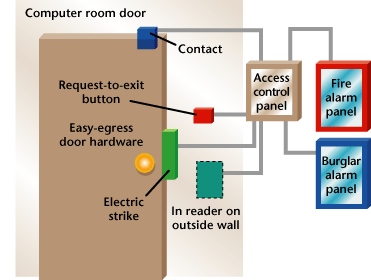
Wally `Larman installed an access control system for a client that included the computer room door. As the work was progressing, the customer requested that the door-held and door-forced alarms be connected to his existing BA system so that he would be alerted if someone improperly opened or failed to close a door. Wally installed the devices as shown in this diagram, but frequently when someone left the computer room, a door-forced alarm was generated. Can you see what Wally did wrong and what he must do to correct the problem?

1. b – Depending upon the manufacturer, access control software can be managed from multiple computers.

2. d – All these factors can be used to decide if access will be allowed or denied. Typically, systems allow the creation of multiple access levels or groups that can be assigned to users.

3. d – Again depending upon the manufacturer’s access control software, any of these communication protocols may be possible. You should check with the manufacturer that you use to determine which they support.

4. d – Every system has different requirements for operating system, drive size, memory etc. You should check with the manufacturer that you use to determine what they require.

5. b – Most systems allow you to mix reader types and technologies.

6. e

7. b – The access software allows you to program which cards are valid at each reader.

8. b

9. d

10. b – Although an enrollment reader may make it easier to add users, many manufacturers do not require a dedicated enrollment reader.

11. d – Smart cards can have other reader technologies incorporated into the card. This can be important when various reader technologies are existing or when dealing with multiple vendors.

12. b

13. b – Depending upon the manufacturer, it is possible to use a data connection to integrate access with other applications.

14. a

15. d – All these devices should be installed on a door with a magnetic lock to provide maximum security and safety.
Answer to: What’s Wrong with This?

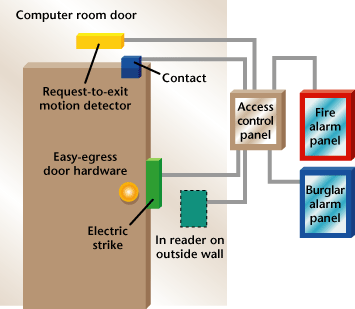
The problem is caused by the fact that Wally installed a request-to-exit button for the computer room door, but the door hardware was easy-egress. This means that anyone can open the door from the inside by simply turning the doorknob. If someone fails to press the request-to-exit button before turning the knob and opening the door, a door- forced alarm will be generated. Wally should install a request-to-exit motion sensor and program it to shut but not open the door. In this way, if someone walks past the request-to-exit motion detector, the door will not unlock, but when they are leaving, it will shut the contact, preventing a door-forced alarm.

Share This Story

Looking for a reprint of this article?
From high-res PDFs to custom plaques, order your copy today!

Recommended Content

JOIN TODAY
to unlock your recommendations.

Already have an account? Sign In

  • SDM 100

    SDM 100: Top 100 Security Dealers of 2026

    The top 100 security dealers navigated a complex...
    SDM 100 Report
    By: Karyn Hodgson
  • Security camera

    State of the Market: Video Surveillance

    As video surveillance shifts from siloed systems to...
    Exclusives
    By: Brianna Wilson
  • 2026 Industry Forecast

    SDM 2026 INDUSTRY FORECAST

    Rapid technology advances meet shifting economic...
    Annual Industry Forecast
    By: Karyn Hodgson
Manage My Account
  • SDM Newsletters
  • Online Registration
  • eMagazine Subscriptions
  • Subscription Customer Service
  • Manage My Preferences

More Videos

Sponsored Content

Sponsored Content is a special paid section where industry companies provide high quality, objective, non-commercial content around topics of interest to the SDM audience. All Sponsored Content is supplied by the advertising company and any opinions expressed in this article are those of the author and not necessarily reflect the views of SDM or its parent company, BNP Media. Interested in participating in our Sponsored Content section? Contact your local rep!

close
  • Doctor examining child patient with mother present in medical clinic
    Sponsored byHID

    The Human Side of Hospital Security: How Modern Visitor Management Protects People First

Popular Stories

Video surveillance camera

Why Video Health Monitoring Is a ‘No Brainer’

ESA Board of Directors Q2 26 Elections

Electronic Security Association Announces 2026 Board of Directors Election Results

TMA & SDM Logos

Becklar, Elite & Puget Win 2026 TMA/SDM Monitoring Center Excellence Awards

SDM Dealer of the Year 2026 Promotion

Poll

What’s the most promising trend in the industry?

What’s the most promising trend in the industry?
View Results Poll Archive

Products

Physical Security Assessment Handbook An Insider’s Guide to Securing a Business

Physical Security Assessment Handbook An Insider’s Guide to Securing a Business

See More Products
SDM 100 2026 Rankings

Related Articles

  • Nexkey

    Nexkey Introduces a Smart Access Platform

    See More
  • Jason Fischbeck, owner of Automated Environments

    The Rise of Smart Access Control in Small Businesses

    See More
  • Adam Stroud

    Smart Access — The Next Security Evolution?

    See More

Related Products

See More Products
  • integrated.jpg

    Integrated Security Systems Design, 2nd Edition - A Complete Reference for Building Enterprise-Wide Digital Security Systems

  • security surveillance.jpg

    Security Surveillance Centers: Design, Implementation, and Operation

  • security culture.webp

    Security Culture: A How-to Guide for Improving Security Culture and Dealing with People Risk in Your Organisation

See More Products

Events

View AllSubmit An Event
  • August 28, 2025

    Smart Home as a Security Differentiator

    ON DEMAND: In a competitive market, offering smart home integration can give dealers and integrators a crucial edge. In this webinar, discover how connected devices can enhance traditional security systems and deepen customer loyalty.
View AllSubmit An Event
×

Be in the forefront of security intelligence when you receive SDM.

Join over 10,000+ professionals when you subscribe today.

SIGN UP TODAY!
  • RESOURCES
    • Advertise
    • Contact Us
    • Directories
    • Store
    • Want More
  • SIGN UP TODAY
    • Create Account
    • eMagazine
    • Newsletter
    • Customer Service
    • Manage Preferences
  • SERVICES
    • Marketing Services
    • Reprints
    • Market Research
    • List Rental
    • Survey/Respondent Access
  • STAY CONNECTED
    • LinkedIn
    • Facebook
    • YouTube
    • X (Twitter)
  • PRIVACY
    • PRIVACY POLICY
    • TERMS & CONDITIONS
    • DO NOT SELL MY PERSONAL INFORMATION
    • PRIVACY REQUEST
    • ACCESSIBILITY

Copyright ©2026. All Rights Reserved BNP Media, Inc. and BNP Media II, LLC.

Design, CMS, Hosting & Web Development :: ePublishing