Installing Internet and Home Networks
1. Cable runs for pre-wiring home networks should be daisy-chained.
a. True
b. False
2. The Internet can be used to:
a. monitor security systems.
b. view remote video.
c. control HVAC and home automation systems.
d. make and receive telephone calls.
e. All of the above
3. Which of the following can provide the highest data transfer rate?
a. Dial-up
b. DSL
c. Cable modem
d. They are all the same.
Looking for quick answers on security topics? Try Ask SDM, our new smart AI search tool. Ask SDM →
4. Which of the following cables may be run when pre-wiring a home?
a. Cat 5e or better data cables
b. RG-6 coaxial cables
c. Jacketed 14/16 AWG cables
d. 22/4 station cables
e. All of the above
5. Cat 6 cables can support transmission frequencies up to 250 MHz.
a. True
b. False
6. A DSL line where the upload and download speeds are different is called:
a. ADSL.
b. SDSL.
c. FTP.
d. ISP.
e. None of the above
7. Twisting wire pairs in data cables helps reduce crosstalk.
a. True
b. False
8. 100-BaseT is a type of Ethernet network.
a. True
b. False
9. A protocol in which a device will obtain its IP address from a server is called:
a. CSS.
b. DHCP.
c. DHTML.
d. ISP.
e. None of the above
10. An intranet requires a TCP/IP connection to the Internet.
a. True
b. False
11. Which of the following should be employed to pro- vide security for an Internet- connected computer?
a. Firewall hardware/software
b. Anti-virus software
c. Spyware software
d. All of the above
12. UDP is a protocol for data transfer.
a. True
b. False
13. Using VoIP will have no effect on a digital dialer’s ability to communicate with the monitoring center.
a. True
b. False
14. All home data networks must be hard-wired.
a. True
b. False
15. The decrease in magnitude of a signal as it is carried along a cable is called:
a. attenuation.
b. reflection.
c. scattering.
d. None of the above
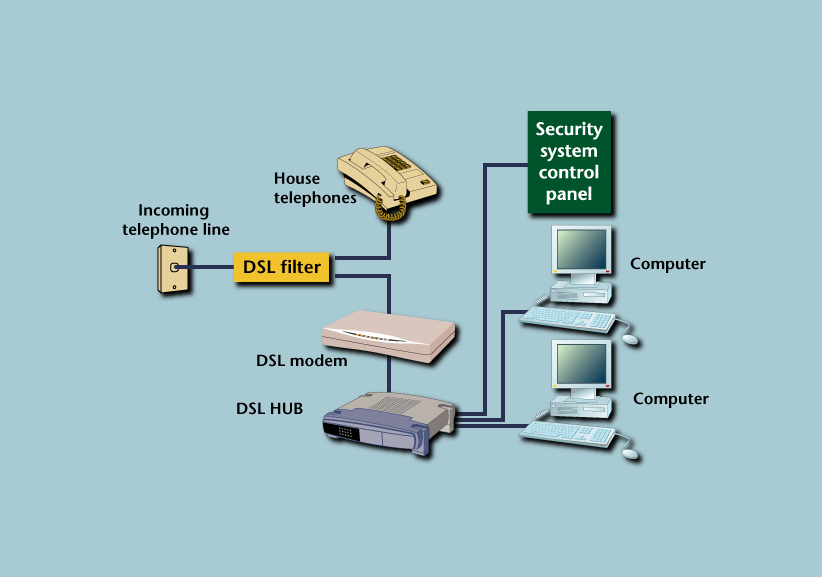
What’s Wrong with This?
Wally `Larman installed an Internet-monitored security system along with a telephone and data network system for a residence that employed DSL as its broadband Internet connection. Wally ran the appropriate cable types and used the correct jacks and connectors to configure the system as shown. However, when he was finished, he was unable to transmit signals to the monitoring center, and the homeowner was unable to establish an Internet connection. Can you see what Wally did wrong?Answers
1. b – When pre-wiring a home, it is recommended that all cables be home run to a head end for termination.2. e
3. c – Although actual speed will vary, typically cable modems provide the highest data rates followed by DSL and dial-up.
4. e – When pre-wiring a home, most installers will run a minimum of two quad-shield RG-6 for television/video, two Cat 5e or Cat 6 cables for data networking, 22/4 station cables for security, and 14/16 AWG for speakers. Fiber-optic cables also may be run for audio and future expansion. The number and type of cables used depends upon current needs and future expansion requirements.
5. a
6. a – ADSL (asymmetric digital subscriber line) is a DSL line in which the upload and download speeds are different. In an SDSL (symmetric digital subscriber line), the upload and download speeds are the same. FTP (file transfer protocol) is a protocol for moving files, and ISP (Internet service provider) is a term used to describe a company or service that provides access to the Internet.
7. a
8. a
9. b – In a DHCP configuration, the IP address will change over time, while in a static IP address configuration, the IP address remains constant.
10. b – An intranet is a private network for internal use that may or may not have a connection to the Internet.
11. d – Each of these is necessary to protect against hacking, viruses and data theft.
12. a
13. b – VoIP (voice over Internet protocol) may interfere with the proper operation of traditional digital dialers. If a customer uses or changes to VoIP, it is important that the ability of the digital dialer to transmit signals be tested.
14. b – As with commercial networks, home networks may be wired or wireless. If wireless networking is employed, it is important that measures be taken to prevent unauthorized users from gaining access to the network.

Answer to: What’s Wrong with This?
Wally’s problem is caused by where he located the DSL filter. Because this filter is used to block the DSL tones from interfering with standard telephone operation, installing it before the DSL modem will prevent it from communicating, thereby denying Internet access. Wally should relocate the filter as shown in this diagram and re-test the operation. It also is a good idea to install a UPS to provide power during brief outages. Also recommended is to connect the security control to the telephone line, if the control supports that configuration, to provide a means of communicating if the Internet connection is down.Looking for a reprint of this article?
From high-res PDFs to custom plaques, order your copy today!