Installing Networks: Home Networking 101
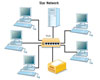
This is a typical basic arrangement for a local
area network called a star.
Entertainment and technology systems have not traditionally been included in the design/planning phases of construction projects until fairly recently. Builders and their clients are more technically savvy than ever before. But the information is constantly changing, making it tougher and tougher to stay ahead of the learning curve.
To stay competitive and profitable, many dealers and integrators are adding audio/video distribution and home wiring, automation and networking to their scope of services.
Mastering systems design is key to a dealer/integrator’s success in this segment. Integral to this is creating a local area network (LAN), which is a network of computers located relatively near each other and connected by Cat 5 cable.
A LAN can consist of two or three PCs connected to share resources, or it can span several hundred computers of different kinds. Any network that exists within a single building, or even a group of adjacent buildings, is considered a LAN.
A LAN permits all the computers connected to it to share hardware, software and data. The most commonly shared resources are disk storage devices and printers.
To LAN users, the network is (or should be) completely transparent, meaning that the shared devices on it seem to be directly connected to the user’s computer as if they were merely peripherals. A file server, for example, should appear to the LAN user simply as another disk drive.
In addition to shared hardware, LANs can provide all of the other benefits of networks, including simultaneous access, enhanced personal communication and easier backup.
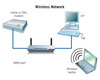
Wireless networks like this one are the trend of
the future.
CHOOSING YOUR NETWORK
The multiple considerations when designing a home or office network include the kind of network to implement. The most common type is called a star network, which places a hub in the center of the network.This setup has the advantage of the hub monitoring traffic and preventing collisions. Additionally, a broken connection does not affect the rest of the network. However, if you lose the hub, the entire network goes down.
The trend of the future and the most cost-effective network is wireless.
To ensure that a wireless home network functions properly, you should consider placing the wireless router at least 10 feet from cordless phones or microwave ovens to avoid potential interference.
If your customer has a large home or office with thick/dense walls, it is suggested you place the wireless router as high and to the center of the house as possible.
If you want access outside, place the wireless router near a window. Try to keep the wireless router away from any large metal objects, because these will hinder its distance.
The modems of most Internet service providers (ISPs) come with wireless routers built in, but make sure your wireless device is compatible with the routers and uses protocols such as 802.11a, b or g.
If they do not, it is quite simple to add a wireless router to an existing network. — Contributed by Lee Duncan, branch manager, Tri-Ed Distribution, Dallas
Look at What ADI Has Done Now!
ADI, Melville, N.Y., expanded its training initiatives to help dealers remain competitive in the low-voltage industry by adding a variety of new training courses in Fire, IP, audio/video, and more.ADI’s program includes ADI Expo seminars, NICET fire alarm preparation courses, security Networking 101 IP training, Networking 201 advanced lab and certification prep courses, Russound’s All Wired Up University, CEDIA home theater audio boot camps, CEDIA Level I review and exam courses, Webinar Wednesdays, National Burglar and Fire Alarm Association (NBFAA) classes, vendor training and counter days, new product rollouts, interactive demonstrations, and more.
ADI is teaming up with industry associations and vendors to provide dealers with training courses to match all skill levels and business needs.
“Last year, I attended the IP training at my local branch and now have a better understanding of how to use networks for security applications,” said Scott Casas, service manager at Security Designs, Livonia, Mich.
ADI and the National Training Center (NTC) are providing NICET Level 1 and 2 fire alarm preparation courses across the country, along with free monthly online training through Webinar Wednesdays. For more information, visit www.adilink.com.
Get Your NICET Sprinkler Training from NTC
The National Training Center (NTC) is offering a training program for those seeking NICET Certification in fire sprinkler systems. The course will focus on the automatic sprinkler system layout certification offered by NICET.The first sprinkler class will be offered during August as a Webinar program. Additional sprinkler Webinars and live classes will follow in 2009.
For information, visit www.NationalTrainingCenter.net.
New Certification on Vindicator System
Honeywell, Louisville, Ky., launched its new Vindicator System Integrator program, which recognizes the commitment that integrators make in delivering Vindicator products and solutions for end users.Vindicator provides integrated security solutions — including intrusion detection, access control, and video surveillance and assessment.
The Vindicator System Integrator program focuses on delivering solutions to end users in a high-quality, consistent manner while offering a choice of qualified delivery options. Integrators are evaluated on Honeywell product training, Microsoft certification, program awards and quality of installation.
With two certification levels, the program enables systems integrators to extend the Vindicator delivery infrastructure with complementary solutions that add value for customers.
The Gold Certified category is designed for systems integrators who display a proven ability to embrace and extend the Vindicator platform to end users. Requirements include the successful completion of at least two Vindicator product training courses and at least three successful Vindicator installations in the past 36 months.
The Platinum Certified category is designed for high-security systems integrators looking to build long-term, committed and mutually beneficial relationships with Honeywell Vindicator Security Solutions.
In addition to meeting the requirements of Gold-level certification, Platinum integrators must also certify that at least one of their team members has successfully completed all Vindicator product training courses. They also must have completed at least five successful Vindicator installations in the past 36 months.
To learn more about the Vindicator System Integrator program, visit http://www.honeywellvindicator.com/VSIP.
Dedicated Micros Launches New Training Program for Customers
Dedicated Micros launched a new program to provide high-quality training to its customers in remote Web-based and classroom-style formats.The training program will focus on Dedicated Micros products, beginning with the new SD series of DVRs, as well as the Digital Sprite2 series of DVRs. Eventually the training will expand to the entire product line.
The training classes — both online and classroom style — are created based on the user’s involvement with the product, offering different content for installers and operators. The task-oriented training allows users to quickly identify and master relevant information to their situation. For more information, visit www.dedicatedmicrosus.com.
Download a New Audible/Visible Applications Guide from System Sensor
A newly revised applications guide from System Sensor, “Audible/Visible Appliance Reference Guide,” covers updated compliance issues regarding audible/visible appliances for fire and life safety. The guide also offers information to specifying engineers, installers and enforcement authorities about the proper installation and usage of these appliances in commercial applications.Numerous charts clearly spell out various code requirements, such as the light distribution, intensity, flash rate, and mounting and placement of visible signaling appliances relative to the area to be protected. Diagrams, such as those depicting correct and incorrect room spacing allocations for strobes, illustrate key points.
For a free copy of the new “Audible/Visible Appliance Reference Guide” or for more information, contact System Sensor at (800) 736-7672. The guide, which is three-hole punched for easy reference, also may be downloaded in PDF format from the System Sensor Web site at www.systemsensor.com.
Looking for a reprint of this article?
From high-res PDFs to custom plaques, order your copy today!


