Powering Network Devices

Many of today’s electronic security systems are designed to operate on a communications/computer network. SDM NetWorkings can help you understand both the intricacies of communication networks, as well as how security systems fit into the networked world. It features excerpts from the “Technician’s Guide to Networking for Security Systems,†a book written by SDM’s contributing technology writer, David Engebretson. (See end of article for ordering information.)
Networking manufacturers are using power supplies ranging from 5.0 to 12 VDC, with no consistency whatsoever. This issue is of great concern for security installations for a number of reasons. If using plug-in transformers, accessible non-switched AC power outlets must be located to power an IP-addressed camera, for example. Consideration has to be given to somehow protecting the plug-in transformer from being unplugged. The transformer also must be located somewhat near the camera, as the length of connection cables provided by the vendors is generally 15 ft. or less. Building electrical and fire code problems can arise if a plug-in transformer and its associated cabling are installed within a plenum ceiling. And even if a suitable, secure, and code-acceptable wall outlet is found, any power failure, brownout, or surge can either disable, destroy, or lock up the software in the device.
The very devices that provide the tremendous flexibility of networking installations are just as susceptible to power problems. Routers, switches, hubs, and cable/DSL adapters all have their own power requirements, and can suffer the same types of problems if there is a glitch in the power grid. What this means is that video or alarm signals and device communications can be lost due to power problems along the signal path.

Enterprise Power Concerns
Power problems can dramatically damage enterprise network functions. A sudden power outage can corrupt database files, ruin hard drives, and stop network functions. To counter this threat, an uninterruptible power supply (UPS) is often found in network equipment rooms, to provide a smooth transition to battery backup power in the event of a utility service problem. As the growth of networking electronic security applications continues, installing companies will become increasingly involved in power protection and UPS selection, particularly if the security dealer is installing a new or parallel network, providing switches, routers and other powered equipment to transport security information.There are two basic functions of a UPS. First, a UPS protects connected equipment from power line surges, spikes, and distortion, which can damage sensitive computers and any software that’s running when the power glitch occurs. Second, the UPS provides backup power from its batteries, if the utility power has failed completely.
There are three distinct types of power products that fall under the general UPS category. Each type provides some level of power protection and emergency backup, with differing grades of protection and sophistication.
The economy model of UPS is generally termed a standby backup offline (SBO) device. These products provide direct connection between utility power and the protected computer equipment, with the same level of surge protection found in an inexpensive plug-in surge protector “six-pack†extension cord. If power fails, the UPS will switch on the battery backup, which is connected through an inverter that converts the DC power from the battery into 60-hertz AC. This emergency power is generally available for only a few minutes, which is enough time to shut down running programs and computers in an orderly manner. SBOs provide little or no assistance during a brownout condition, where utility voltage has dropped for longer than a few seconds.
An upgrade to SBO technology is the line interactive or LI UPS. These devices have all of the characteristics of an SBO, with the addition of a power line monitoring function, which can add power from the battery pack to make up for brownout voltage deficiencies. This voltage regulation feature is important, and worth the increased cost.
An LI UPS has a potential problem that should be brought to light: If it expends its battery backup power to bring voltage levels up during a brownout and then utility power subsequently stops completely, the UPS may not be able to provide enough backup time for an orderly computer network shutdown.
Looking for quick answers on security topics? Try Ask SDM, our new smart AI search tool. Ask SDM →
The top-shelf UPS is the online type, which provides a complete electrical firewall between any connected devices and utility power service. Incoming AC power is conditioned and provided in a three-step process. Because of this, an online UPS provides transition to backup power with no start-up or delay time. Computers and software are fully protected from utility power anomalies because of the electrical isolation provided.
For electronic security installations, powered devices should always be connected to a UPS, if available. In the case where the installation includes new network transmission equipment such as switches and routers, the installing company may need to supply a separate UPS for backup power.
Network Powering Option
As the use of Ethernet networks expands, one of the exciting new technologies now available is called VoIP (Voice over Internet Protocol). VoIP replaces standard telephone communications, converting analog telephone calls into data packets, and transmitting them over the Internet.When implementing VoIP, one of the issues is the matter of how the telephone instrument is to be powered. With a standard telephone connected to a POTS (Plain Old Telephone Service) line, 48-volt DC power is provided on the two-wire phone line from the telco central office to power the connected telephone instrument. Because this power is backed up from the central office, standard telephones will usually still work even during a local power failure.
When installing VoIP telephones, there is no power available from a typical Ethernet connection, so a power transformer must be plugged in near the telephone. This situation causes two potential problems – where to plug in the transformer/power supply and the potential for phone failure during a power outage. Similar issues also can arise when installing Wi-Fi access points and other network devices.
Power over Ethernet (PoE)
Recognizing this problem, the IEEE developed the 802.3af standard, which specifies how DC current can be coupled to pairs within the Ethernet UTP cable, providing voltage to power VoIP telephones. This standard is commonly termed Power over Ethernet, or PoE. PoE is specified at 48 volts DC, with current limited to 350 milliamps.Power is supplied to the same pairs that are used for transmission and receiving in 10/100 Ethernet. Devices capable of using the power, such as a VoIP telephone set, are termed powered devices. The powered device has circuitry which taps the voltage from the Ethernet connection and supplies it to the device itself.
Although the unused two pairs of the four-pair UTP cable may also be used to transmit power, most manufacturers and end users are implementing the same pairs technology, leaving the unused spares for future Gigabit Ethernet upgrade potential.
There are two methods of injecting power into the UTP Ethernet pairs. The first is called Endpoint power, with the power injection being included in the Ethernet switch itself. This method is typically used if a new switch is installed.
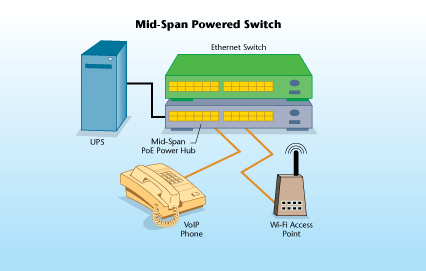
For existing Ethernet switches, Midspan power injection can be added. This is a device, separate from the switch and generally located directly under or over the switch in a rack-mount arrangement. Short UTP jumpers are connected from the ports on the switch to ports on the midspan power source. A second set of ports on the power source provide PoE-enabled outputs, which are connected to the structured cabling wall outlets.
The clear advantage to this technology is that the power for VoIP telephones and other devices can be supplied centrally from PoE-equipped Ethernet switches. When primary power to the PoE switch is connected to a suitable UPS, backup power is available for all connected devices. This eliminates the need for separate power supplies for connected devices.
The availability of PoE will become a tremendous benefit for networked electronic security system installations. With one or two exceptions, electronic security equipment manufacturers have yet to build network cameras or video servers with PoE capability. Over time, this situation will surely improve, as major vendors are already producing some PoE devices.
Although this is a new concept in powering electronic security devices, installation companies should embrace the availability of PoE. By utilizing this power source, cabling for device power and/or plug-in transformers can be reduced or eliminated, and security devices can be provided with backup power from centralized UPS sources.
Looking for a reprint of this article?
From high-res PDFs to custom plaques, order your copy today!