Keeping An Eye On The Home Is Smart
- A splitter can add analog CCTV video signals to a home antenna system.
a. True
b. False
- A 100 Base-T home network has a maximum bandwidth of:
a. 10 Mbps.
b. 100 Mbps.
c. 1,000 Mbps
d. None of the above
- What factors determine the amount of bandwidth that an IP-based video system will require?
a. Compression technique
b. Resolution
c. Frame rate
d. All of the above
e. None of the above
- IEEE 802.11 is a standard that covers:
a. Video compression techniques
b. Wireless networks
c. Hard-wired networks
d. All of the above
e. None of the above
- A home network that uses home run cabling is called a bus topography.
a. True
b. False
- The coupling of unwanted signals from one pair of wires within a cable to another pair of wires is called:
a. Attenuation
b. Cross-talk
c. Bonding
d. Capacitance
e. None of the above
- A device that connects multiple network devices to a single home data network is called a hub.
a. True
b. False
- A VPN is a type of network that uses a public network to communicate confidentially.
a. True
b. False
- Exceeding the available network bandwidth can result in:
a. Choppy images.
b. Video artifacts.
c. Slow network performance.
d. Any of the above
e. None of the above
- You should use a Cat 3 cable to connect IP cameras to a 100 Mbps network.
a. True
b. False
- A video system that uses 1 Mbps (1 megabit per second) will require how much storage for a 24-hour period?
a. 24 megabytes
b. 1 gigabyte
c. 11 gigabytes
d. All of the above
e. None of the above
- Multimode fiber provides higher bandwidth and lengths than single-mode fiber.
a. True
b. False
- A video encoder can be used to connect an analog CCTV camera to a data network.
a. True
b. False
- Each IP camera installed on a network requires its own unique network IP address.
a. True
b. False
- Home network cables should be tested for:
a. Opens/shorts
b. Miswired/split pairs
c. Cable length
d. All of the above
e. None of the above
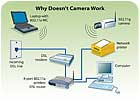
WHY DOESN’T CAMERA WORK?
One of Wally’s residential customers asked him to install a camera to monitor who is at the front door of his home and connect it to his existing network. Wally decided that because it would be very difficult to run cables from the front door to the network hub, he would install a wireless camera and utilize the existing wireless router/hub that was installed many years ago. He selected a state-of-the-art wireless camera and installed it as shown in this diagram, but when he tried to get it to work, he was unable to do so. Can you see what Wally did wrong and what he must do to correct the problem?15 Answers about Smart Homes
Stop! If you haven’t already taken our 15 Questions about Smart Homes quiz, then turn back to page 14. If you have, then get ready to score yourself and learn something in the process. Although 15 Questions about Smart Homes is not accredited by an official learning institution, we’ve created a scoring guide anyway, just for fun.Number of correct answers & Rating
15 Excellent
13-14 Very good
11-12 Good
9-10 Average
8 or fewer Poor
- b — To add an analog camera to an existing TV antenna system, a modulator is needed, which takes the analog video signal and adds a selectable channel carrier frequency so that it can be viewed as any other channel on the TV.
- b
- d
- b — The 802.11 standard has protocols a, b, g and the newest, n.
- b — Home runs are used for Star topography, which is the most common network cabling technique being installed today.
- b
- a — Another device called a switch also will accomplish the same task and offers some advantages over a standard hub.
- a
- d
- b — Cat 3 cable will not support 100 Mbps data rates. Cat 5e cable should be used instead.
- c
- b
- a — Video encoders are devices that allow standard analog cameras to connect to a data network. A video decoder can connect an analog video monitor to a data network.
- a
- d — Proper operation of a data network requires not only that the cables and connectors be free of any opens or shorts, but that the wires are properly run and terminated. Improper installation of network cables can result in degraded operation.
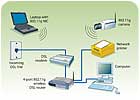
Answer to Why Doesn’t Camera Work?
Wally’s problem is caused by the protocol of the existing wireless equipment and that of the new camera he selected. The existing system utilized 802.11a wireless, but the camera used the newer 802.11g protocol. These are not compatible. The 802.11a operates on a frequency of approximately 5 GHz, while the 802.11g utilizes 2.4 GHz.Wally should replace the existing wireless router/hub and laptop NIC card with new devices that are compliant with the 802.11g standard as shown in this diagram. As an alternative, he may be able to add an 802.11g wireless access point to the existing system, which will allow the camera to work. The former option is better because it provides a simpler network configuration, and most wireless network devices available today do not work with the older 802.11a protocol, although the range and speed of both are essentially the same.
Before removing the old wireless router/hub, Wally should carefully record all settings in its setup so that he can use them to configure the new units. It is very important that you fully understand the various protocols involved when using wireless devices and only use devices that are fully compatible.
Looking for a reprint of this article?
From high-res PDFs to custom plaques, order your copy today!


