Digital Tools Help Control Room Designers Build Optimal Functionality in 3D Format
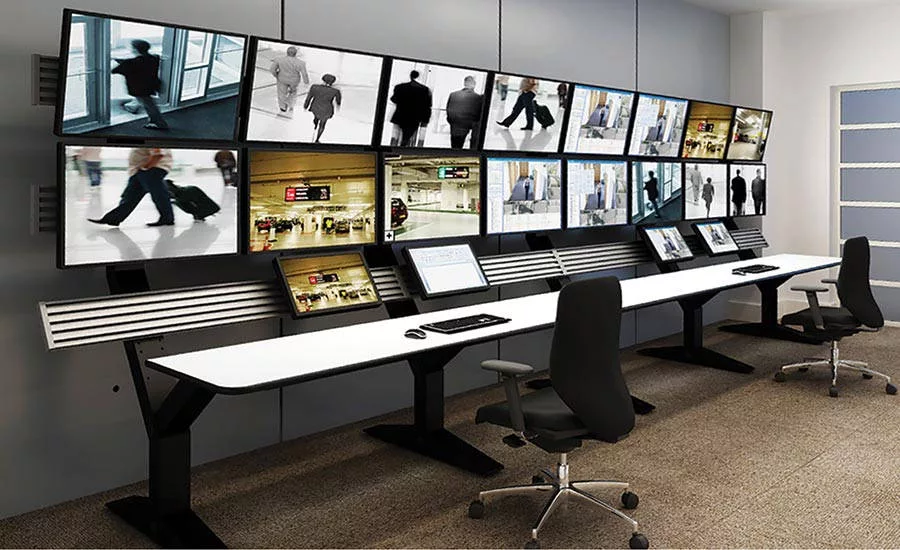
A completed console that was designed using the WELS software. IMAGE COURTESY OF WINSTED
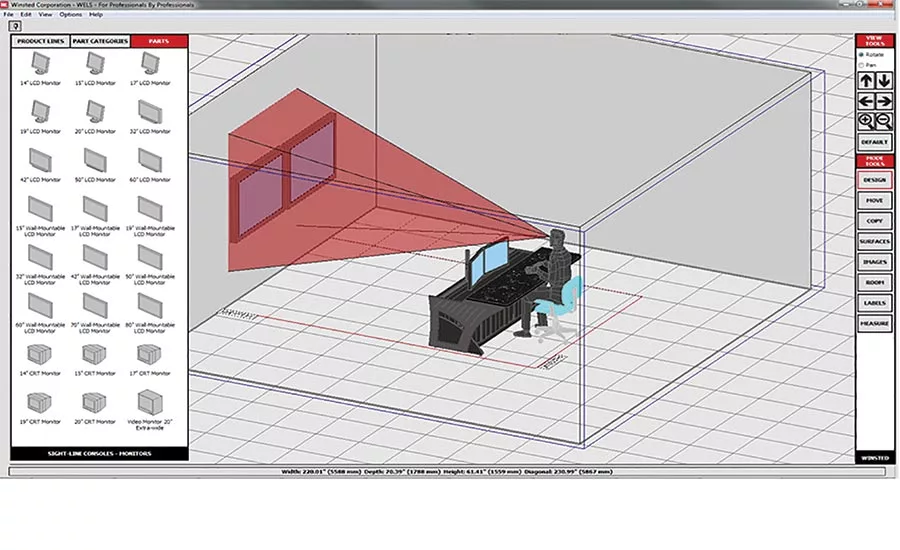
Incorporating sightlines can help designers consider operator comfort. IMAGE COURTESY OF WINSTED
It may look like magic, but transforming bare walls and empty space into an ergonomic, high-functioning control room takes serious logistics and design work. For designers, installers and consultants in this area, helping architects and end users create security and surveillance control rooms that optimize space, enhance workflow and ensure proper ergonomics with intuitive integration is no small feat.
In an industry where product catalogs and CAD drawings dominate, visualizing a finished control room in the conception stage is difficult at best. New digital tools in control room design are changing the way the industry creates workspaces and room layouts for optimum security and surveillance operations.
“Digital design tools help us illustrate visually what we used to only be able to explain with words,” said Charlie Howell, principle of Division 28 Consulting in Dallas. “With these tools, architects and end users are able to see exactly what the room will look like and make determinations about functionality in a virtual environment.”
A Complete Control Room — in 3D
Many design software programs exist for laying out rooms, but a particular application called WELS (Winsted Equipment Layout Software), designed by Winsted Corporation, a control room console manufacturer in Minneapolis, gives options for 3D renderings. The standalone system creates 3D renderings of entire control rooms to match floor plans, giving designers and end users the opportunity to see the room and make adjustments to the space before finalizing the build out.
“We can add furniture and operators to the design layout to understand the viewing patterns and ergonomic considerations for each operator station,” said Howell, whose company consults with government agencies, schools, architectural firms and other organizations on security control room design. “We can illustrate exactly what a room will look like. Bringing actual visualization to the end user is a night-and-day difference compared to explaining the details without visuals like we had to do in the past.”
While a console manufacturer designed the software, the WELS application can be used to design rooms complete with furniture, monitors, LCDs, DVD players, keyboards, blank panels, doors, walkways and many other features — plus generate part lists and design specification sheets. All of these features are included in a 3D rendering that can be used to finalize the space before construction.
“Using the program to design the room, I can put in consoles, I can hang monitors on the walls, I can add doors and walkways, so we can really give our client a perspective as to how the finished room is going to look in the space,” said Michael Hobart, vice president of sales at Broadcast Technical Services Inc. in Houston, a company that provides design and integration services for control rooms in houses of worship, stadiums and other types of facilities. “This is much better than me flipping through a catalog or doing a pencil sketch on a blank sheet of paper — believe me, I’m not an architect. The renderings really give the end user a good idea of how his or her finished space is going to look.”
Looking for quick answers on security topics? Try Ask SDM, our new smart AI search tool. Ask SDM →
Design files can be exported as jpg files for design discussions, as well as dwg and dxf files for importing into AutoCAD programs to produce architectural and engineering drawings. These files are used to produce the final 3D rendering, which closely mirrors the actual room.
“We generate the files for the desks, consoles and racks using WELS, then we import those files into our AutoCAD drawing for the room,” said Biju Kumar, design engineer at DVS Security in Hamden, Conn. “From there, we can include features from the architect, such as the carpet pattern, the color of the wall, ceiling tiles — even the kind of lighting and conduit holes. With all of this information, we can create a rendering of the entire room that is a realistic presentation and 99 percent accurate.”
Managing Real Workflow in a Virtual Environment
Jake Rhodes, an instrumentation and controls designer with Ford, Bacon and Davis LLC in West Monroe, La., uses the software to design control room spaces in wood product and fabrication mills. He uses many of the tools in the application to help design the space to create 2D and 3D visual renderings that map out workflow patterns to help create streamlined processes.
“The options in the program are just about limitless and the system is foolproof because it won’t let you place a console or any other type of fixture where it’s incompatible,” he said. “We can create the space and see what it is going to look like when operators are sitting at a computer. Then we can see the sightlines and viewing angles and move components around to create the most productive and ergonomic space.”
Rhodes used the application to retrofit an existing control room that housed several 90-degree desktop corners, which created an assortment of L-shaped workspaces. After realizing the corner layout diminished sightlines when one operator seated in a corner blocked two computers, he took the challenge to the WELS program to design a new layout.
“You can’t get two people in a corner, so we decided on a wide-angle layout with 15-degree desktop corners,” he said. “This way, we could retrofit the existing space, curve the work stations into the room, and place two operators side by side without blocking sightlines. I was able to play around with the design in the digital WELS program to see that it was possible.”
Kumar and DVS Security used similar program features to implement ergonomic consoles that featured a sit/stand option, where operators can raise or lower their desks to alternate between sitting and standing. For this particular project, managing sightlines and viewing angles became challenging when considering the possibilities of multiple operators sitting or standing at any given time.
“When a person stands, their viewing angle toward the video wall is different than from a seated position,” he said. “As an added element, this control room had five operators — three in the front and two in the back. If a person is sitting behind a person standing, of course it is going to block the view a little bit, but we were able to consider all of the viewing angles and even the specific viewing patterns, and the design program helped us lay out the desks so that each operator had optimum viewing angles from either a seated or standing position.”
Visualizing the Possibilities
While architects and end users appreciate the opportunity to preview the room as a complete visual rendering, digital applications such as the WELS program allow these individuals to be involved in the design process. With the flexibility to make changes to the control room layout while viewing the room in the design stage, the people who will be using the room can make adjustments.
“The end user can be interactive with the layout, which makes them involved in the design process,” Hobart said. “They are included and they don’t feel like the process is simply a salesperson walking in and throwing a booklet down and making all the decisions. They are empowered to change colors, add a monitor, add a desk, and really gain a sense of ownership with the entire project.”
As more and more designers and end users collaborate with digital tools in control room layout design, the details transform from vague unknowns to clearer realities. Bringing all elements of a room together in a 3D rendering can help consultants, designers and integrators have an easier time communicating with architects and end users to develop intuitive, highly functional spaces for optimal productivity.
“The best part about digital tools is that there aren’t any surprises for the end-user,” Hobart said. “There are far fewer risks of miscommunications or misunderstandings because the design program lets end-users see what the room will look like, which takes a lot of guesswork out of the entire process.” — Contributed by Rich McPherson, regional sales manager, Winsted Corporation. Winsted provides ergonomic control room solutions designed to enhance comfort, functionality and productivity.
Looking for a reprint of this article?
From high-res PDFs to custom plaques, order your copy today!