Installing Video Cameras on a Parallel Network
Once it has been determined that parallel conductors are available between the horizontal cross-connect and the main cross-connect, and the conductors have been tested for suitability (see “Using a Parallel Network for a Video Camera,†SDM, July 2005, p. 88 or www.sdmmag.com), then security technicians can begin the installation of network cameras on a parallel network, connected to available UTP backbone pairs.
The horizontal UTP is pulled from the camera location to the telecommunications closet, with male RJ-45 plugs installed on each end. If only one camera is being connected to that particular horizontal cross-connect, its cable can be plugged directly into the parallel backbone UTP for data transport to the main room. If more than one camera, video server, or IP-addressed security device is being connected in one closet, the installing company would place a hub or switch with sufficient port quantity in the closet. This device requires AC power, and its transformer would preferably be connected to a UPS.
Once the cameras are connected, properly addressed and programmed, their video signals will be available on the monitoring computer, once it is connected to the selected backbone UTP within the main connection room.
Fiber Hookup
The connection to available fiber backbone conductors is similar to the UTP example, with the addition of a pair of fiber-to-UTP media converters, which are simple, non-programmable devices that retransmit Ethernet UTP signals onto fiber, and change the optical signals in the fiber to electrical Ethernet data on the other end.
As with the UTP parallel system, if more than one security device needs to be connected within a single horizontal cross-connection room, the security company will need to provide a switch or hub with the proper number of ports. Once the cameras are connected via UTP to the switch/hub, a UTP patch cable is used to connect the switch to the media converter.
Fiber Media Converters
There are many manufacturers of fiber-to-UTP media converters, and each provides many different devices. The proper selection of a media converter requires knowledge of the type of fiber in place, how many fibers the client will allow you to use, and the overall length(s) of the fiber cables to be used.Multimode fiber is used for distances less than four miles. Multimode fiber will be labeled on the jacket as 62.5/125 or 50/125, which indicates the sizes of the fiber core and cladding in microns, which are millionths of a meter.
Fiber labeled 9/125, 8/125 or 10/125 is the singlemode type, which is used for long distance and high bandwidth applications.
Media converter models are differentiated by the type of fiber (multimode or singlemode), number of fibers needed (one or two), the maximum distance over which they can communicate, and whether the devices will transmit 10, 10/100, or 1,000 Mbps Ethernet. Fiber media converters that use two fibers are less expensive than those that use a single fiber for communications.
Once a media converter model is selected, remember to order one for each connection end, along with appropriate power supplies.
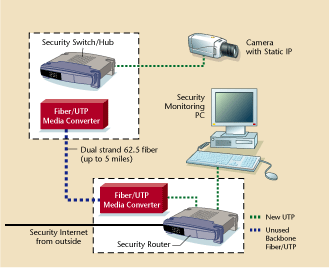
Viewing Options
Once the network cameras, video servers, or other electronic security devices are connected and communicating on the LAN within the building, various options are available to provide viewing and control capability for authorized users. It is a simple matter to connect a single computer to the parallel network to be used as the primary viewing and control station. If additional computers within the building are to have access to the security devices, they can be connected by installing or connecting separate UTP cable, which is then connected to the parallel security network via an available hub or switch port. Each computer also will need an additional separate NIC card.Pre-installation Testing of Parallel Systems
One of the great advantages of parallel networking of electronic security systems is that the entire system can be connected, programmed and tested at the dealer’s office before being installed at the client’s location. Video servers, network cameras, and other IP security devices can be addressed, programmed, and connected to a temporary network made from simple UTP patch cords. Such pre-testing will expose any problems with the programming and/or connections, and these problems can be resolved before the installation starts. If the system has been pre-tested, network cameras and other IP security devices can be labeled and numbered for rapid and sure installation into the client’s location.10/100 Problems
The Security Networking Institute has tested many network security devices, along with commonly available hubs, routers, switches and fiber media converters. During these tests there have been occasional problems with specific devices not passing their data through network hardware, such as switches. The typical problem found is that some 10 Mbps devices will not transmit their signals through some hubs and switches, even those that are labeled as 10/100 Ethernet-compatible. This can cause problems for electronic security installations, particularly those involving the connection of security devices to enterprise network hardware provided by the client or already in place. Many of the high-performance enterprise switches either will not pass 10 Mbps Ethernet data, or may need to be reprogrammed to provide this function. This problem also appears when using inexpensive fiber media converters, as the least expensive units only transmit 100 Mbps, while many security devices only transmit at 10 Mbps.Looking for quick answers on security topics? Try Ask SDM, our new smart AI search tool. Ask SDM →
Looking for a reprint of this article?
From high-res PDFs to custom plaques, order your copy today!



