Security Networkings: Internet WAN Connections & Services
There are various ways in which Internet access can be provided to a user.
Dial-up
A modem, often built into a computer, is connected to a standard telephone line. When activated, it dials a programmed number, reaching one of a bank of modems provided by an ISP. The modems convert the digital communications (ones and zeros) into analog sounds, which are carried over the telephone line, and converted back to their digital component on the other end. Once communications between the modems is established, the ISP’s router will use DHCP to temporarily assign an IP address to the session.
Dial-up is the slowest Internet communication method in common use, with maximum data speeds of approximately 40-45 kilobits per second (kbs). Because of their slow data speed, modem communications are not desirable for video or bandwidth-intensive security applications. Dial-up’s positive feature is portability, allowing users to connect to the Internet while traveling.

DSL
Higher-speed “broadband†services are always connected to the Internet, provided that the Internet adapter is physically connected to the network and powered.An Internet connection based on upgraded telephone lines, called DSL, provides much faster Internet communications than dial-up connections. DSL stands for Digital Subscriber Line, and is actually an offshoot of an earlier technology used for alarm signal communications, which was called “Derived Channel.†DSL connections are provided by the installation of a DSL adapter, which connects a local computer, or LAN, to a standard telephone line which in turn is connected to a Digital Subscriber Loop Access Multiplexer (DSLAM) located in the providing telephone company’s central office. DSL service is generally available to customers who live no more than 12,000 feet from the central office, as it may not work properly beyond that distance.
DSL uses a section of the bandwidth available on a standard telephone line to transmit digital ones and zeros, while leaving adequate room for voice communications to be carried simultaneously.
Notice that the transmission bands are separated, so that the voice and data signals do not interfere with each other. There are several different types of DSL service, including symmetrical (SDSL) and asymmetrical (ADSL). ADSL is commonly used for residences and small businesses, while larger businesses may use SDSL.
With SDSL service, identical bandwidth is available in both directions. With ADSL there is a much larger bandwidth available for downstream data transmission, coming to the subscribers’ computer, than is available for upstream data going to the Internet. ADSL services were engineered in this manner to best meet typical Internet usage, where a user’s single mouse click on a Web page (upstream data) produces a large downstream data flow, for example a photo or new Web page to be viewed.
This can present problems for video applications connected to DSL lines, as video images require large amounts of upstream bandwidth to transmit motion video over a network.
Looking for quick answers on security topics? Try Ask SDM, our new smart AI search tool. Ask SDM →
Cable Modem
The coaxial cable used to provide multi-channel television for homes and residences can also be used to provide broadband ISP services. A cable modem is connected to the copper coax cable coming into the building, and connected to the local computer or LAN. Just as DSL adapters enable data to share bandwidth with voice communications, cable modems share bandwidth with video (and sometimes telephone) services.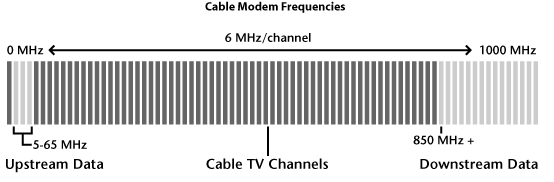
Broadband Connections and Electronic Security
Cable ISP service leads DSL in the number of U.S. users by two to one. Government statistics (2003) indicate that more than 38 million homes and businesses in the United States are connected to the Internet via either cable or DSL broadband.DSL and cable modem connections are suitable for network-enabled CCTV, access control, and alarm transmitters. Because these technologies are usually “always-on,†remote access for video viewing or system control doesn't require any personnel to be on-site to activate a connection. These technologies also provide larger bandwidth than dial-up, and remote viewing of reasonable quality video signals.
Alarm clients with broadband connections are perfect candidates for sophisticated alarm and video systems. Lower-security digital communicator alarm signal transmission can be upgraded or supplemented with an IP alarm transmitter, which sends its alarm signals over the ISP network in digital format to the central station. These transmitters can be programmed for polling, where the transmitter and central station regularly exchange communications. Polling assures both parties that the transmitter and central station are prepared for alarm signal transmissions, and can notify the central station and subscriber of line or network failure.
Network-enabled cameras can be installed and programmed for broadband-equipped clients, particularly if the client has a Wi-Fi router in use. Video servers can connect existing CCTV systems to the Internet using broadband.
Satellite
In some (primarily rural) areas, neither DSL nor cable ISP services are available. Two-way satellite services can deliver broadband Internet communications to such places, provided that the satellite dish can be installed with a clear view towards the equator.The bandwidth capabilities of consumer-grade satellite connections are from one-half to one-third of the speed of DSL or cable modem services.
While satellite service is functional for electronic security purposes, it is not preferable if either DSL or cable modem service is an option. Installation of satellite subscriber equipment requires a licensed radio technician, and costs for installation alone can approach $1,000. Also, this service has higher monthly service costs than its competitors.
T1 Leased Lines
Larger commercial enterprises will often opt for a T1 line, which is a digital offering providing much higher data bandwidth than what is available from DSL, cable, or satellite services. Typically, a fiber optic connection or high-grade four-conductor copper cable is connected from a nearby telco central office to a client’s location. At the customer premises is a Customer Service Unit/Digital Service Unit (CSU/DSU), which provides a wired Ethernet output to which the LAN is connected. Full T1 connections provide 1.54 Mbps throughput, generally with high data integrity and reliability. Static IP addresses are available, and many users can be readily connected to one T1 line, providing high-speed data connections for all.Virtual Private Network
Typical data transmissions carried over the Internet or a WAN are not protected; therefore, the information is potentially readable by others on the network at the same time. Many organizations use some form of encryption, where data is scrambled using a special mathematical formula called an algorithm.Many enterprises want to connect their computer networks together, hooking up networks that may be physically separated by miles. The most secure method to accomplish this is the use of leased lines, but this option is very expensive. Connecting the separate networks over the Internet is attractive from a cost perspective, but can leave sensitive communications vulnerable to interception.
To provide for secure network communications over the Internet or a WAN, the Virtual Private Network (VPN) was developed.
A typical VPN consists of a hardware VPN server. The VPN server provides data encryption and decryption. Authorization or verification of the identity of remote users is a second VPN server function. VPN technology can be used over the Internet or on an intranet, which is a computer network linking multiple buildings using leased lines.
VPNs and Security Devices
While it is conceivable that electronic security devices might be successfully connected through VPN devices over the Internet, there are a number of problems with this approach. Most currently produced IP-addressed security cameras, video servers, and alarm interfaces do not have the capability of having the client VPN software installed into them, so they would have to be connected through an existing VPN server to allow communications over the “secure†network. This would then require that the electronic security devices be connected to the enterprise network, which may or may not be allowed by the IT manager. If this type of connection is allowed, the IT manager will have to provide the proper IP addresses and likely will need to manipulate the settings of the VPN server to allow the communications.Another issue is the VPN’s authentication process for users and devices. Some electronic security equipment, such as IP alarm signal transmitters, may only transmit data periodically. Such periodic transmissions may be challenged by the VPN server at the receiving end, which may demand a user name and password from the transmitter. The IP alarm transmitter may not have the capability within its program to answer such a challenge, causing a failure of communication.
Another problem for security devices connected through a VPN is bandwidth. The process of encrypting and decrypting data packets slows transmission speeds. This would likely have a detrimental effect on video images, which are large files, and will take more time to encrypt and decrypt than a text file, for example. Some VPN servers have a maximum throughput of only 600 Kbps, or 0.6 Mbps, which would make the successful transmission of motion video from remote locations impractical. Alarm transmission and access control systems would likely be able to communicate over a VPN, while video signaling most likely will not.
Tech Note:
Standard DSL service typically provides DHCP addressing for the adapter. Upgraded DSL service can provide static IP addresses and increased bandwidth. While both of these upgrades could be useful for general security and video surveillance purposes, they will increase the monthly costs for the DSL service, and may not be available in all areas.Tech tip:
If planning the connection of network security devices over a VPN, check with the manufacturers of the security equipment for their recommendations, and consult with the client’s IT management to ensure the transmission path and compatibility of all intended devices and connections. Additionally, VPN encryption may cause latency or a delay between the transmission and reception of a data signal, which may cause erratic operations or monitoring of remote IP-addressed security devices.Looking for a reprint of this article?
From high-res PDFs to custom plaques, order your copy today!