SDMmag logo
search
Go to Ask SDM AI
cart
facebook twitter linkedin youtube
  • Sign In
  • Create Account
  • Sign Out
  • My Account
SDMmag logo
  • NEWS
  • PRODUCTS
  • TOPICS
    • Access Control & Identification
    • Integration & Network Solutions
    • Life Safety & Fire Alarm
    • Monitoring
    • Smart Home
    • Trends & Industry Issues
    • Video Solutions
  • COLUMNS
    • Digital Shuffle
    • Editor's Angle
    • Insider News & Business
    • Integration Spotlight
    • Marketing Madmen
    • Security & the Law
    • Security Comings & Goings
    • Security Networkings
    • Technology @ Work
    • Technology Solutions & Skills
    • SIA Waypoints
    • Cybersecurity Chronicle
  • EXCLUSIVES
    • Annual Industry Forecast
    • Dealer of the Year
    • Project of the Year
    • SDM 100
    • State of the Market Series
    • Systems Integrator of the Year
    • Top Systems Integrator Report
    • TMA Excellence Awards
  • BLOG
  • MEDIA
    • Videos
    • Podcasts
    • Polls
    • White Papers
  • EVENTS
    • Industry Calendar
    • Webinars
  • MORE
    • Classified Ads
    • Newsletters
    • SDM Store
    • State of Security eBook
    • Sponsored Insights
  • BUYERS GUIDE
    • Buyers Guide
    • Take a Tour
  • EMAG
    • eMagazine
    • Archive Issues
    • Monitoring Today
    • Advertise
  • SIGN UP!

Expert Tips on Video Installation
October 1, 2004
As video surveillance systems have become more and more powerful, it has never been more important to have properly trained installers than today. In this article, SDM examines some of the most common installation errors, which involve everything from the lens to the digital video recorder. All of these errors can be easily avoided by noting the correct procedures explained here.

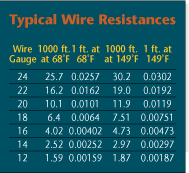
Wire resistance is stated here in single units and in units of 1,000 ft., so that the installer can best estimate the resistive load on an installation. If the wire run were 335 ft., the installer would take the 1-ft. wire resistance load value and multiple it by 335 ft. to determine the total resistance load. The 1,000-ft. resistance load value is used for whole wire spools, because wire is commonly shipped in 500- or 1,000-ft. spools. In addition, ambient temperature affects the resistance of conductors. The colder the conductor is, the less resistance. Always design your system using values that would reflect a worst-case scenario.
Use the right gauge of coaxial cable for the distance to be covered. With few exceptions, coax runs to video cameras should not exceed 1,000 feet for RG-59 cable or 1,500 feet for RG-6 cable (see the diagram, “Coaxial Cable Gauge Sets Installation Distance,” on next page). “For longer runs, you should think about fiber optics or microwave,” notes Paul Baran, chairman of the national training school for the National Burglar and Fire Alarm Association, Silver Spring, Md.

Make sure the system is adequately powered by using the right gauge twisted pair wire to connect all powered devices. Don’t violate Ohm’s Law, Baran cautions. That formula is:

E (or voltage) = I (current) x R (resistance).

“E” is a fixed number – usually either 12 or 24 volts. “I,” which is calculated by adding up the current draw of all peripherals, is also fixed – and Baran advises installers to add a 20 percent safety margin. That means the only factor that an installer can control is “R” – or the resistance of the wire – which is determined by its length and gauge, Baran notes. Installers also may have little flexibility with the length of the wire. But what they can easily control is the wire gauge. (See “Typical Wire Resistances” table on this page, for help in selecting the right gauge wire.)

Select the right lens format for use with a particular camera model. “The lens format is based on the size of the image capture device,” Baran says. Today, these image capture devices are chips that usually measure 1/2-inch, 1/3-inch, or 1/4-inch. Check the camera’s spec sheet and be sure to purchase a lens designed to work with that type of chip. “A mismatched lens can make it look like you’re looking down a tube,” Baran cautions.

Select the right focal length lens to give the client the desired view. “If you want to identify the object, then you probably need a lens that will allow a more telephoto range, such as a 5-50mm lens, rather than a 3-8mm lens,” notes Steve Beaulieu, national sales manager for Tamron USA Inc., Commack, N.Y. “If you only want to see activity in a wide area, you can use a 3-8 mm lens and cover more than 90 degrees. But you must remember that you will not be able to identify an object beyond 20 or 30 feet.”

Consider using an aspherical lens when installing a camera in a brightly-lit area, advises Cynthia Freschi, president of North American Video, a systems integrator headquartered in Brick, N.J. Such lenses diffuse the light so that the video images do not appear washed out, Freschi notes.

Before installing a color camera, ensure that the digital video recorder (DVR) to which it will be attached can accept a color input, Freschi adds. Most can, she notes, but when retrofitting an existing installation, this can sometimes be an issue. Even when an image appears in color on the monitor, the recorded images could still be black and white if the DVR can’t handle color.

Be sure to change the DIP switches that are commonly found on pan/tilt/zoom cameras, advises Don Taylor, vice president of marketing for Dedicated Micros Inc., Chantilly, Va. Typically these DIP switches are set to Camera 1 as a default and must be changed to match whatever has been programmed into the DVR.

Looking for quick answers on security topics? Try Ask SDM, our new smart AI search tool. Ask SDM →

Consult with the client to determine the optimum combination of storage capacity and frames per second to be recorded. “It’s a balancing act,” Baran says. “Get feedback from the client about what’s really important.” To ensure capturing an image of a moving subject, you will likely need to record at least 7 frames per second. To minimize storage requirements, consider programming the system so that the frames per second recorded are increased when motion is detected – or consider using a DVR that enables different cameras to record at different frame rates. Image resolution also has a big impact on storage requirements. A low-resolution image may consume 5 kilobits of storage space, while a high-resolution image may consume 40 kilobits, Baran notes.

When connecting a video system to an Ethernet network, be sure not to use Category 5 wire runs longer than 300 feet from any device to the nearest Ethernet hub. Use fiber for any runs that must exceed 300 feet.

When connecting a DVR directly to a computer using the Ethernet port (as when programming the DVR), use a crossover cable – not a patch cable. Although both cables look similar and have the same types of connectors on each end, the patch cable is designed to connect to network devices, such as hubs, and will not work in this situation. To avoid confusion, purchase crossover cables in red so they can be identified easily.

Before running a camera and fiber module from the same power supply, be sure they have compatible power systems, advises Fred Kelmer, an engineer for Infinova, Monmouth Junction, N.J. Both devices must use the same type of rectification – full-wave or half-wave – and polarity should be observed. “Fiber products have thermal fuses,” Kelmer notes. “These open, then close. But they give up after a couple hundred cycles.” That can cause a short that can actually cause one of the devices to go up in smoke, Kelmer says.

When programming a DVR or matrix system, be sure to back up the system configuration to a disk or flash memory. This can facilitate reprogramming the system if settings ever should be erased.

Never discuss reset and back door codes for matrix systems with security personnel, advises Hayley Herrmann, brand marketing manager for Tyco. Armed with such information, “a disgruntled employee can render a system useless within seconds,” Herrmann notes. (See sidebar for additional matrix system installation tips.)

Coaxial runs to video cameras normally should not exceed 1,000 ft. for RG-59 cable and 1,500 ft. for RG-6 cable.

How to Ensure a Dependable Matrix Installation

- Cable management is paramount. Use labels and/or color-coded wire. Document everything.

- Think expansion. Plan ahead for system growth to prevent overgrown equipment rooms that have heat/space problems.

- Have properly trained personnel configure/program matrix switchers, as they tend be complicated in terms of alarms, macros, multi-protocol devices, etc.

- A good rule of thumb is to have a keyboard/monitor video source in the equipment room as a permanent troubleshooting tool. This way you will not disturb security personnel.

- Back up system configuration to disk and keep in a readily available location.

- Use an oscilloscope with TV triggering to check video levels. Many installations have open, shorted, unterminated or double-terminated, or distorted video signals.

Source: Tyco

Share This Story

Looking for a reprint of this article?
From high-res PDFs to custom plaques, order your copy today!

Recommended Content

JOIN TODAY
to unlock your recommendations.

Already have an account? Sign In

  • SDM 100

    SDM 100: Top 100 Security Dealers of 2026

    The top 100 security dealers navigated a complex...
    Exclusives
    By: Karyn Hodgson
  • Security camera

    State of the Market: Video Surveillance

    As video surveillance shifts from siloed systems to...
    Exclusives
    By: Brianna Wilson
  • 2026 Industry Forecast

    SDM 2026 INDUSTRY FORECAST

    Rapid technology advances meet shifting economic...
    Exclusives
    By: Karyn Hodgson
Manage My Account
  • SDM Newsletters
  • Online Registration
  • eMagazine Subscriptions
  • Subscription Customer Service
  • Manage My Preferences

More Videos

Sponsored Content

Sponsored Content is a special paid section where industry companies provide high quality, objective, non-commercial content around topics of interest to the SDM audience. All Sponsored Content is supplied by the advertising company and any opinions expressed in this article are those of the author and not necessarily reflect the views of SDM or its parent company, BNP Media. Interested in participating in our Sponsored Content section? Contact your local rep!

close
  • Doctor examining child patient with mother present in medical clinic
    Sponsored byHID

    The Human Side of Hospital Security: How Modern Visitor Management Protects People First

Popular Stories

April Maloney, Guardian Protection

State of the Market: Security’s ‘Sixth Sense’ Drives Intrusion & Smart Home

ESA Board of Directors Q2 26 Elections

Electronic Security Association Announces 2026 Board of Directors Election Results

AMAG CONNECT-2.0

Beyond the Buzzwords: What Security Integration Really Looks Like Today

SDM Dealer of the Year 2026 Promotion fire alarms webinar

Events

July 23, 2026

Fire Alarms in Focus: Tech Trends, Code Changes & Business Growth Strategies

In this webinar, SDM will explore how companies are expanding their fire offerings, increasing recurring revenue, and strengthening customer relationships. Discover practical insights to help position your company for success.

View All Submit An Event

Poll

What’s the most promising trend in the industry?

What’s the most promising trend in the industry?
View Results Poll Archive

Products

Physical Security Assessment Handbook An Insider’s Guide to Securing a Business

Physical Security Assessment Handbook An Insider’s Guide to Securing a Business

See More Products
SDM 100 2026 Rankings

Related Articles

  • Expert Tips On Digital Video Storage

    See More
  • Expert Tips on Networking Video

    See More
  • FIELD GUIDE TO DVRS: Expert Tips: On DVR installation

    See More
×

Be in the forefront of security intelligence when you receive SDM.

Join over 10,000+ professionals when you subscribe today.

SIGN UP TODAY!
  • RESOURCES
    • Advertise
    • Contact Us
    • Directories
    • Store
    • Want More
  • SIGN UP TODAY
    • Create Account
    • eMagazine
    • Newsletter
    • Customer Service
    • Manage Preferences
  • SERVICES
    • Marketing Services
    • Reprints
    • Market Research
    • List Rental
    • Survey/Respondent Access
  • STAY CONNECTED
    • LinkedIn
    • Facebook
    • YouTube
    • X (Twitter)
  • PRIVACY
    • PRIVACY POLICY
    • TERMS & CONDITIONS
    • DO NOT SELL MY PERSONAL INFORMATION
    • PRIVACY REQUEST
    • ACCESSIBILITY

Copyright ©2026. All Rights Reserved BNP Media, Inc. and BNP Media II, LLC.

Design, CMS, Hosting & Web Development :: ePublishing
