15 Questions about Smart Homes
Today’s security dealers are constantly looking for ways to
expand their offerings and increase market share. To accomplish this, some
dealers have added home networking and home theater to their bag of tricks.
Although these may be a natural fit, they do require specialized knowledge in
order to be successful. If you lack the requisite knowledge or fail to keep
pace with the rapid advances in technology, any venture into these markets can
result in dissatisfied customers and spell doom to your business.
To see if you are in tune with these technologies, take our 15 Questions quiz. Then turn to page 28 and find out how you scored.
1. In order to surf the Internet, all computers on a home network require their own static Internet IP address.
a. True
b. False
2. Network address translation (NAT) is used to:
a. translate English into a different language.
b. allow a home network to share a single Internet connection.
c. protect against viruses.
d. None of the above
3. A network device that forwards traffic between network segments is called a:
a. bridge.
b. cable modem.
c. hub.
d. VPN.
e. None of the above
4. Which of the following is a wireless network standard?
a. 802.11a
b. 802.11b
c. 802.11g
d. All of the above
5. Ethernet switches are considered faster than Ethernet HUBs.
a. True
b. False
6. A network device that will distribute a single Internet connection to all computers on a home network is called a:
a. bridge.
b. cable modem.
c. router.
d. switch.
e. None of the above
7. MAC address filtering can be used to increase security on a wireless network.
a. True
b. False
8. Hubs can be used to add ports to a home network.
a. True
b. False
9. What is the maximum length for an Ethernet cable?
a. 50 feet
b. 100 feet
c. 300 feet
d. 1,000 feet
10. Crossover cables are used to directly connect one computer to another computer.
a. True
b. False
11. What is the Windows XP command to determine the IP address of a computer?
a. defrag
b. dir
c. ipconfig
d. winipcfg
e. None of the above
12. Home data networks can be either hard-wired or wireless.
a. True
b. False
13. Which of the following is an example of a video connection?
a. Component
b. Composite
c. DVI-HDTV
d. S-Video
e. All of the above
14. A video cable that consists of three cables with RCA connectors is used for:
a. component.
b. composite.
c. DVI-HDTV.
d. S-Video.
e. None of the above
15. What type of cable should be run between a satellite dish and its receiver?
a. Cat 5e
b. RG-59U
c. RG-6U
d. Any of the above
e. None of the above
Stop! If you haven’t already taken our 15 Questions about Smart Homes quiz, then turn back to page 27. If you have, then get ready to score yourself and learn something in the process. Although 15 Questions about Smart Homes is not accredited by an official learning institution, we’ve created a scoring guide anyway, just for fun.


To see if you are in tune with these technologies, take our 15 Questions quiz. Then turn to page 28 and find out how you scored.
1. In order to surf the Internet, all computers on a home network require their own static Internet IP address.
a. True
b. False
2. Network address translation (NAT) is used to:
a. translate English into a different language.
b. allow a home network to share a single Internet connection.
c. protect against viruses.
d. None of the above
3. A network device that forwards traffic between network segments is called a:
a. bridge.
b. cable modem.
c. hub.
d. VPN.
e. None of the above
4. Which of the following is a wireless network standard?
a. 802.11a
b. 802.11b
c. 802.11g
d. All of the above
5. Ethernet switches are considered faster than Ethernet HUBs.
a. True
b. False
6. A network device that will distribute a single Internet connection to all computers on a home network is called a:
a. bridge.
b. cable modem.
c. router.
d. switch.
e. None of the above
7. MAC address filtering can be used to increase security on a wireless network.
a. True
b. False
8. Hubs can be used to add ports to a home network.
a. True
b. False
9. What is the maximum length for an Ethernet cable?
a. 50 feet
b. 100 feet
c. 300 feet
d. 1,000 feet
10. Crossover cables are used to directly connect one computer to another computer.
a. True
b. False
11. What is the Windows XP command to determine the IP address of a computer?
a. defrag
b. dir
c. ipconfig
d. winipcfg
e. None of the above
12. Home data networks can be either hard-wired or wireless.
a. True
b. False
13. Which of the following is an example of a video connection?
a. Component
b. Composite
c. DVI-HDTV
d. S-Video
e. All of the above
14. A video cable that consists of three cables with RCA connectors is used for:
a. component.
b. composite.
c. DVI-HDTV.
d. S-Video.
e. None of the above
15. What type of cable should be run between a satellite dish and its receiver?
a. Cat 5e
b. RG-59U
c. RG-6U
d. Any of the above
e. None of the above
Stop! If you haven’t already taken our 15 Questions about Smart Homes quiz, then turn back to page 27. If you have, then get ready to score yourself and learn something in the process. Although 15 Questions about Smart Homes is not accredited by an official learning institution, we’ve created a scoring guide anyway, just for fun.
15 Answers about Smart Homes
Here are the answers to 15 Questions about Smart Homes, which appears on page 27.- b — Each computer requires its own IP address on the local area network, but all the computers can share a common Internet IP address.
- b — Network address translation is a commonly used IP translation and mapping technology that allows a network to share a common Internet access.
- a
- d — All these are wireless network standards -- the major difference is their speed and cost.
- a — Switches allow the Ethernet cards to operate in full duplex mode and route traffic directly between ports instead of broadcasting traffic across all ports, but they are somewhat more expensive than hubs.
- c
- a — MAC address filtering allows you to register the various wireless adaptors with the wireless router and force it to reject communications from an unknown device. This can prevent unlisted devices from accessing your LAN.
- a — Hubs or switches can be used to provide ports to a LAN.
- c
- a
- c — The IPCONFIG command in Windows XP or 2000 can be used to determine the IP address of a computer. If you have Windows 98 or Millennium, then the command is winipcfg.
- a — They also can be a mix of hard-wired and wireless ports.
- e
- a
- c — Due to the frequencies involved, you should use RG-6, not RG-59 for satellite cabling.
Sharing Problems
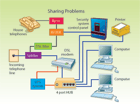
Wally ‘Larman installed a hard-wired network for a residential account that consisted of a single static IP address DSL Internet connection, two desktop computers, a printer and an Internet-monitored security system. Wally ran Cat 5e cables from each computer, printer and the security control to a central point and installed the equipment as shown in this diagram. When he was finished, his customer told him that he had problems sharing files and printers as well as problems connecting to the Internet. Can you see what Wally did wrong and what he must do to correct the problem?Pre-Wiring Problem
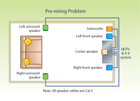
Wally ‘Larman installed a pre-wire for a home A/V system designed to accommodate a 5.1 audio system. Wally ran Cat 5e cables from the audio system to the speaker locations specified by the A/V contractor as shown in this diagram, but when the A/V installer arrived to connect the audio components, he had a major problem. Can you see what Wally did wrong and what he must do to correct it?Answer to Sharing Problems
The problem is caused by the device he selected to connect the various components together, the four-port hub. Although hubs are used to connect multiple computers to a single LAN, they lack the intelligence to separate the internal network from the external network of the Internet. A router also will provide limited protection against an outside hacker gaining access to files, although it will not protect against denial of service or virus attacks. Wally should replace the hub with a compatible DSL router as shown in this diagram and then have his customer test the operation of the network. The hub may not be needed because most DSL routers have four or more ports that can be used to connect network devices, such as computers and printers. When installing home networks, it is important that you fully understand the operation and functions of the various devices so that you can design a functional network.Answer to Pre-wiring Problem
The problem is caused by the type of cable Wally ran to the speaker locations. Cat 5e cable may be appropriate for network wiring, but due to the power levels involved, it is not acceptable for speaker wiring. Wally should remove the Cat 5e cable and install the correct size speaker cable, depending upon the overall length of each speaker run. If the run is less than 50 feet, typically a 16 AWG unshielded cable can be used, but to be on the safe side, Wally should ask the A/V installer what size and type of cable he prefers. It is very important whenever you are running cables for another contractor that you obtain in writing the exact locations of each device, the wire requirements and any restrictions on how the cable should be installed.Looking for a reprint of this article?
From high-res PDFs to custom plaques, order your copy today!


