SDMmag logo
search
Go to Ask SDM AI
cart
facebook twitter linkedin youtube
  • Sign In
  • Create Account
  • Sign Out
  • My Account
SDMmag logo
  • NEWS
  • PRODUCTS
  • TOPICS
    • Access Control & Identification
    • Integration & Network Solutions
    • Life Safety & Fire Alarm
    • Monitoring
    • Smart Home
    • Trends & Industry Issues
    • Video Solutions
  • COLUMNS
    • Digital Shuffle
    • Editor's Angle
    • Insider News & Business
    • Integration Spotlight
    • Marketing Madmen
    • Security & the Law
    • Security Comings & Goings
    • Security Networkings
    • Technology @ Work
    • Technology Solutions & Skills
    • SIA Waypoints
    • Cybersecurity Chronicle
  • EXCLUSIVES
    • Annual Industry Forecast
    • Dealer of the Year
    • Project of the Year
    • SDM 100
    • State of the Market Series
    • Systems Integrator of the Year
    • Top Systems Integrator Report
    • TMA Excellence Awards
  • BLOG
  • MEDIA
    • Videos
    • Podcasts
    • Polls
    • White Papers
  • EVENTS
    • Industry Calendar
    • Webinars
  • MORE
    • Classified Ads
    • Newsletters
    • SDM Store
    • State of Security eBook
    • Sponsored Insights
  • BUYERS GUIDE
    • Buyers Guide
    • Take a Tour
  • EMAG
    • eMagazine
    • Archive Issues
    • Monitoring Today
    • Advertise
  • SIGN UP!
Video SolutionsSecurity NetWorkings

Wi-Fi Overload and a Powerful Solution
By Dave Engebretson
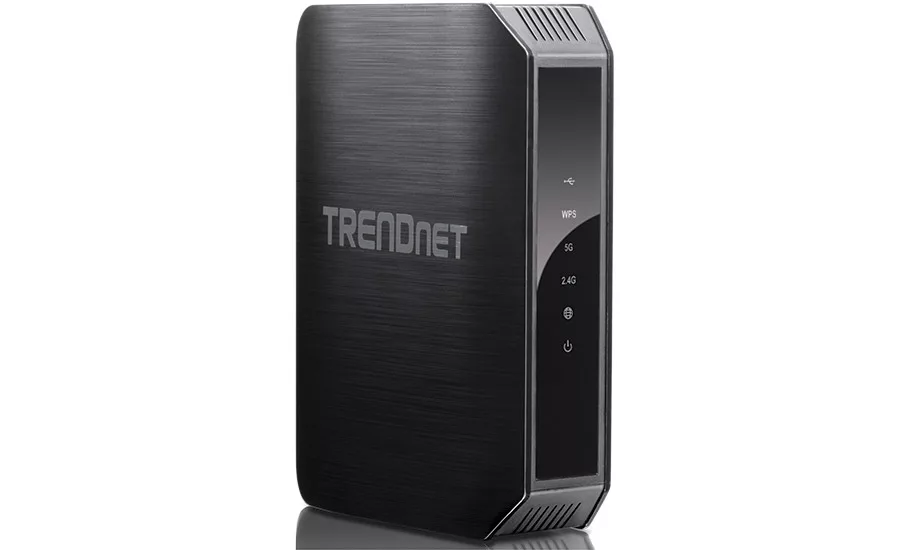
TRENDnet router

This TRENDnet TEW-813DRU provides the latest in 802.11ac Wi-Fi along with Gigabit wired Ethernet connections.
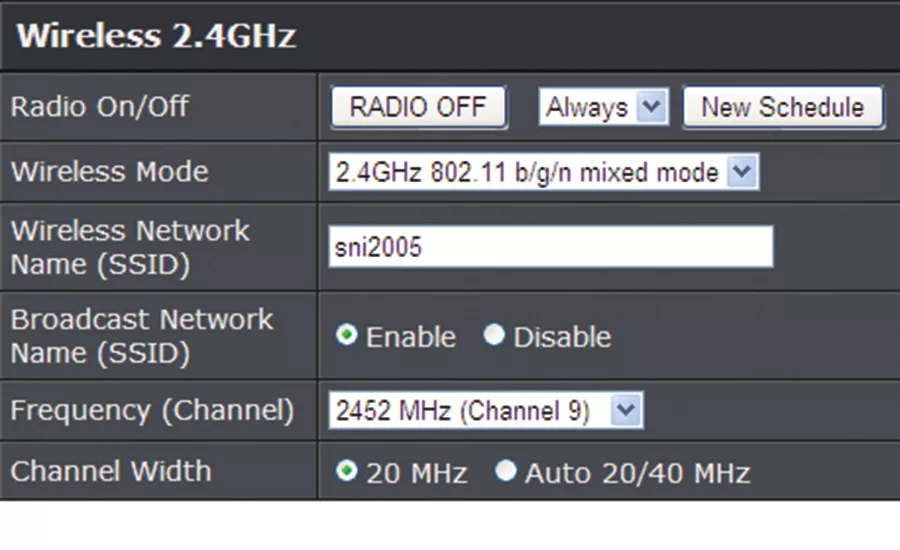
TRENDnet 24-ghz

The TRENDnet TEW-813DRU provides standard Wi-Fi 802.11 b/g/n and can segregate the frequency and channels.
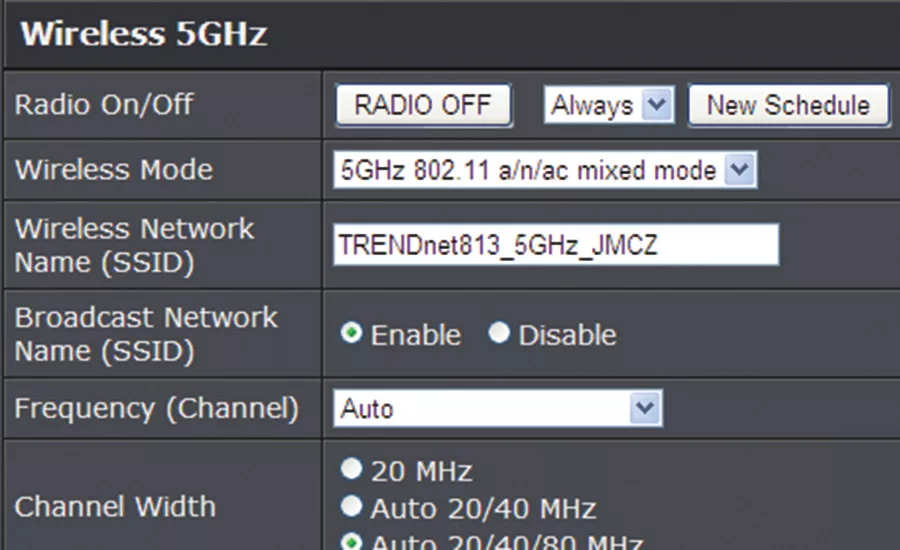
TRENDnet 5-Ghz wi-fi

5GHz settings for 802.11 n/ac connectivity. Please note that the “RADIO OFF” button is a toggle; clicking this button will disable that Wi-Fi connection.
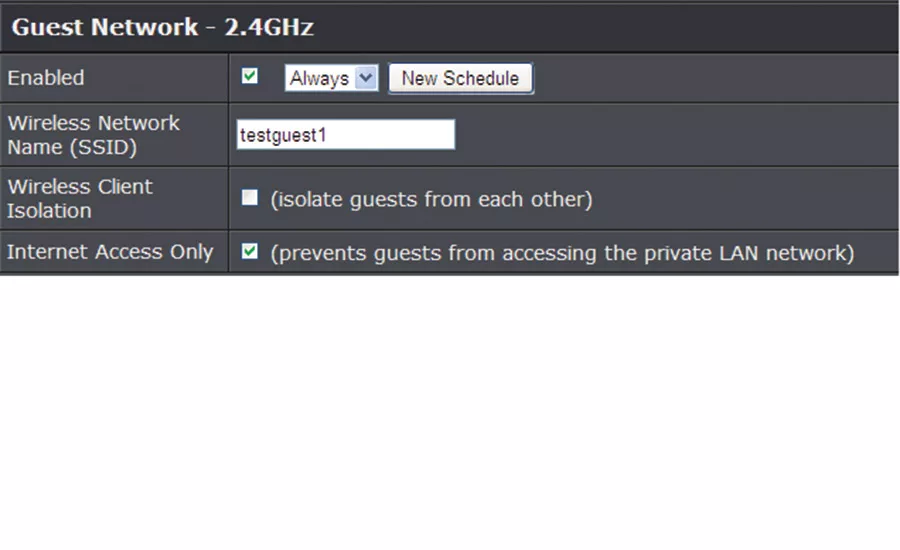
TRENDnet guest network

“Guest Network” settings allow for client isolation and Internet access only if desired.

TRENDnet router
TRENDnet 24-ghz
TRENDnet 5-Ghz wi-fi
TRENDnet guest network
April 1, 2016

The bunker in Bucktown is becoming inundated with Wi-Fi devices. As I attempt to count up the number of devices competing for my wireless connectivity, I believe I have about 11 devices that are banging through my airwaves most of the day.

As most of us can see, our world is becoming increasingly connected via Wi-Fi wireless Ethernet. The growing proliferation of smartphones/tablets, Internet TV boxes, gaming consoles, and even thermostats all need quality Wi-Fi communications to operate properly. I believe it’s safe to say that in the future most “client” IP devices will be Wi-Fi, while the network infrastructure (switches, routers and Wi-Fi access points) will continue to be wired or cabled.

Because of the non-wired nature of connections between Wi-Fi client devices and wireless access points, many end-users are overloading their old 802.11b/g/n wireless networks, slowing down communications for all devices that are using the Wi-Fi simultaneously.

To address this issue the IEEE Standards Association approved a new Wi-Fi standard, 802.11ac, in January of 2014. This new standard provides a theoretical 1.3 Gbps of throughput, which is approximately twice the bandwidth of the previous “hot rod” 802.11n standard at 600 Mbps.

About a year ago I obtained an 802.11ac access point and installed it upstairs in our two-story home. When I connected to it with my Android, the Wi-Fi bandwidth jumped from about 30 Mbps to more than 150 Mbps. While this was a great increase in bandwidth, it came with a relatively high cost for the access point, as is typical when new technology hits the market. It starts off expensive and, once sales start rolling in, the prices drop.

Even with the bigger Wi-Fi pipe I realized I had other issues that were choking my LAN and Internet throughput. I zeroed in on my old purple and black 802.11g router/switch. I suspected that one of the issues was that that switch provided only 10/100 wired Ethernet connections, while my ISP box and new Wi-Fi access point can both communicate with the 1000 Mbps/1 Gbps Ethernet protocol.

So out with the old and in with the new. The TRENDnet TEW-813DRU is a complete Internet router with four built-in wired Ethernet ports and the wired port for connection to an ISP adapter, all with 10/100/1000 Mbps protocols. This high-powered router sells for less than $90 at your favorite distributor.

Looking for quick answers on security topics? Try Ask SDM, our new smart AI search tool. Ask SDM →

Replacing the old router was very simple and quick. First I went into the programming of the old box and took screenshots of the IP addresses and DHCP settings, the Wi-Fi SSID and security code, and the “port forwarding” settings for my variety of IP cameras. After printing these out, I sat down with my laptop and programmed the new TRENDnet router with the same information. Once that was done all I had to do was unplug the network cables and power cord from the old router and plug the network cables into the TRENDnet unit. I then toggled the power on the ISP box. Once it had reset itself, I powered up the TRENDnet router and everything was working, and much faster than it did before.

What I found interesting when programming the device is the multiple Wi-Fi options that are available. Up to three separate combinations of SSIDs and security codes can be programmed into the router, providing a number of flexible options.

It’s important to remember that while the Wi-Fi access point can be upgraded, there may be older remote or client devices on the network that can do only 802.11b or g Wi-Fi. With this TRENDnet router, those older devices can be segregated onto the 2.4 GHz radio band.

A separate SSID and security code can be set up for newer devices that have 802.11n and/or 802.11ac capabilities.

(Please note that for security purposes I have clipped off the setting screens for the security codes.)

The third possible SSID setting is unique in that it can be programmed to provide a “guest” network that can only go to the Internet, and not to any internal devices within the LAN.

So I’ve got great Wi-Fi in my house and am no longer afraid to hand out my security code to my daughter’s friends who want to use their smart devices in our home.

Why should my faithful readers care about this router?  Because every time you visit a client’s home or office you should take a look at their network router and other infrastructure equipment. If their devices are old, it’s a simple upgrade that is easy to perform and doesn’t cost a lot of money; your customers will thank you for giving them the upgrade they need.

KEYWORDS: security systems

Share This Story

Looking for a reprint of this article?
From high-res PDFs to custom plaques, order your copy today!


Dave engebretson

Dave Engebretson is the President of Slayton Solutions and has been connecting and occasionally frying pieces of alarm and video equipment since 1977. Visit his website www.slaytonsolutionsltd.com and check out his online and self-study training packages for fiber optics, IP networking, and proper connector installation and testing.

Recommended Content

JOIN TODAY
to unlock your recommendations.

Already have an account? Sign In

  • SDM 100

    SDM 100: Top 100 Security Dealers of 2026

    The top 100 security dealers navigated a complex...
    SDM 100 Report
    By: Karyn Hodgson
  • Security camera

    State of the Market: Video Surveillance

    As video surveillance shifts from siloed systems to...
    Exclusives
    By: Brianna Wilson
  • 2026 Industry Forecast

    SDM 2026 INDUSTRY FORECAST

    Rapid technology advances meet shifting economic...
    Exclusives
    By: Karyn Hodgson
Manage My Account
  • SDM Newsletters
  • Online Registration
  • eMagazine Subscriptions
  • Subscription Customer Service
  • Manage My Preferences

More Videos

Sponsored Content

Sponsored Content is a special paid section where industry companies provide high quality, objective, non-commercial content around topics of interest to the SDM audience. All Sponsored Content is supplied by the advertising company and any opinions expressed in this article are those of the author and not necessarily reflect the views of SDM or its parent company, BNP Media. Interested in participating in our Sponsored Content section? Contact your local rep!

close
  • Doctor examining child patient with mother present in medical clinic
    Sponsored byHID

    The Human Side of Hospital Security: How Modern Visitor Management Protects People First

Popular Stories

Video surveillance camera

Why Video Health Monitoring Is a ‘No Brainer’

ESA Board of Directors Q2 26 Elections

Electronic Security Association Announces 2026 Board of Directors Election Results

TMA & SDM Logos

Becklar, Elite & Puget Win 2026 TMA/SDM Monitoring Center Excellence Awards

SDM Dealer of the Year 2026 Promotion

Poll

What’s the most promising trend in the industry?

What’s the most promising trend in the industry?
View Results Poll Archive

Products

Physical Security Assessment Handbook An Insider’s Guide to Securing a Business

Physical Security Assessment Handbook An Insider’s Guide to Securing a Business

See More Products
SDM 100 2026 Rankings

Related Articles

  • Powerful, affordable CCTV solution

    See More
  • Briana Clark, Regional Sales Manager, Critical Infrastructure, Western North America, Echodyne

    Air & Ground-Based Threats: How to Circumvent “Sensor Overload” When Building a Resilient, Multi-Layered Security Solution

    See More
  • Hikvision Wi-Fi IP Camera Solves Furnace Problem

    See More

Related Products

See More Products
  • Physical Security and Safety: A Field Guide for the Practitioner

  • security book.jpg

    Security Investigations: A Professional’s Guide

  • security culture.webp

    Security Culture: A How-to Guide for Improving Security Culture and Dealing with People Risk in Your Organisation

See More Products

Events

View AllSubmit An Event
  • June 25, 2025

    Approaching and Optimizing AI as a Security Solution

    ON DEMAND: Artificial intelligence is rapidly transforming the security industry. Discover how AI reshapes organizations to detect threats, respond to incidents, and streamline operations. 
View AllSubmit An Event
×

Be in the forefront of security intelligence when you receive SDM.

Join over 10,000+ professionals when you subscribe today.

SIGN UP TODAY!
  • RESOURCES
    • Advertise
    • Contact Us
    • Directories
    • Store
    • Want More
  • SIGN UP TODAY
    • Create Account
    • eMagazine
    • Newsletter
    • Customer Service
    • Manage Preferences
  • SERVICES
    • Marketing Services
    • Reprints
    • Market Research
    • List Rental
    • Survey/Respondent Access
  • STAY CONNECTED
    • LinkedIn
    • Facebook
    • YouTube
    • X (Twitter)
  • PRIVACY
    • PRIVACY POLICY
    • TERMS & CONDITIONS
    • DO NOT SELL MY PERSONAL INFORMATION
    • PRIVACY REQUEST
    • ACCESSIBILITY

Copyright ©2026. All Rights Reserved BNP Media, Inc. and BNP Media II, LLC.

Design, CMS, Hosting & Web Development :: ePublishing