Central Station Automation Software Gets Smarter, More Versatile
Command center and cloud capability, artificial intelligence, and new apps and communications options enhance functionality.
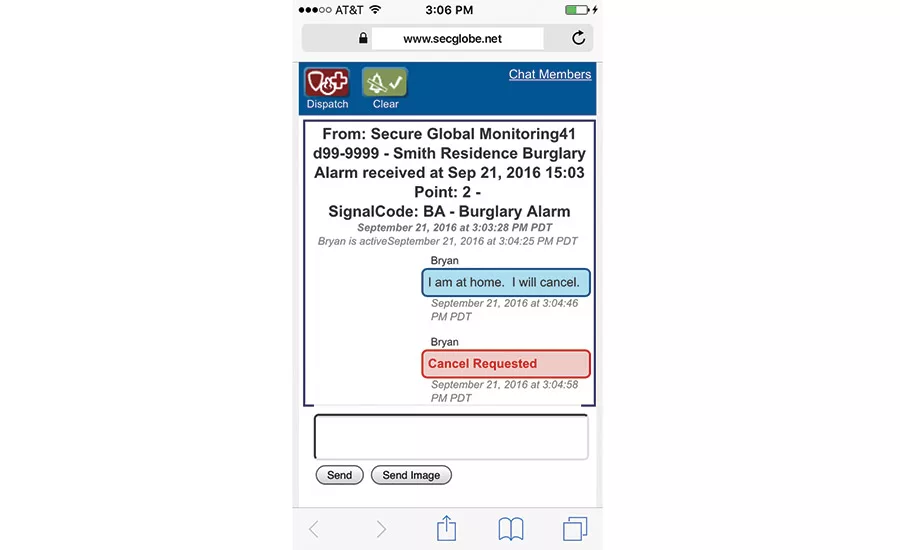
Chat capability from companies such as Secure Global Solutions enables key customer personnel to resolve how to deal with alarm events among themselves. PHOTO COURTESY OF SECURE GLOBAL SOLUTIONS
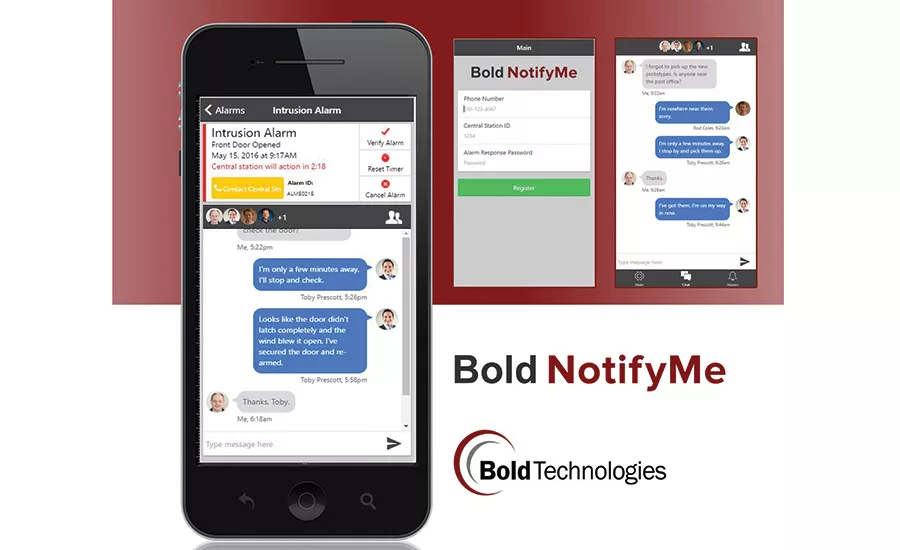
Some manufacturers, including Bold, offer apps that let end users cancel or verify an alarm signal with central station operators with the push of a button. PHOTO COURTESY OF BOLD TECHNOLOGIES

AlarmSoft’s central station automation software handles signals from Defender, a device that combines the functionality of a pepper sprayer with a personal emergency alert. PHOTO COURTESY OF ALARMSOFT

One area of security where there always seems to be something new is in central station automation software. Enhancements made this year or underway include capabilities aimed at helping central station operators perform more efficiently, such as chat capability and apps that let end users cancel or verify alarms before the operator dispatches. Other new capabilities could generate new revenue streams for dealers, including the ability to supplement a customer’s command center or to use artificial intelligence to offer new types of alerts to customers.
SDM spoke with several developers of central station automation software to learn more about these and other improvements. The responses they shared clearly demonstrate that central station automation companies are applying creativity and technology to the monitoring business, enhancing existing functionality and opening up new opportunities for security dealers.
SureView Systems: Command Center Services
Business customers that operate their own command centers traditionally didn’t use much in the way of monitoring services, but that is now changing, notes Simon Morgan, chief technology officer for Tampa, Fla.-based SureView Systems.
In addition to providing security for their organizations, command centers now are being asked to integrate other systems, Morgan explains. “As systems become more complicated, suddenly security directors are overwhelmed by all of the systems they have,” he comments.
Security directors are not experts at some of the new responsibilities they are being asked to handle and would prefer to outsource some of those responsibilities. To meet that demand, SureView enhanced its central station automation software to add command center capabilities such as business risk, situational awareness, and providing GPS locations of people or guards.
Capabilities such as these enable SureView, for example, to receive signals from systems saying a shipment may be late and to coordinate response based on that information.
Secure Global Solutions: Augmenting the Cloud
Cloud-based central station automation software has been an important trend recently. For example, Stages automation software from Secure Global Solutions is a cloud-based option that augments existing central stations by extending central station functionality to other locations.
Looking for quick answers on security topics? Try Ask SDM, our new smart AI search tool. Ask SDM →
But some companies using cloud-based automation software are finding that they want the ability to house some data locally. To address those needs, Irvine, Calif.-based Secure Global Solutions introduced nextStage — a piece of equipment that “allows all data to be housed locally on physical hardware to communicate redundantly with the central station,” explains Thom Meyer, chief operations officer for Secure Global Solutions.
Companies using nextStage gain local access to and integration with the data, Meyer notes. This would be useful if, for example, the account wants to integrate the automation system data, which continually updates in real time, with its own customer response management software.
Secure Global Solutions also is one of several central station software suppliers, including Bold Technologies, that has added “chat” technology originally developed for social media, to the mobile or online app that lets customers see the status of their account. This capability, delivered from the central station, automatically creates a chat group among key personnel when an alert is received. The personnel can then to resolve how to handle an alert among themselves and click a button to advise central station personnel of the resolution.
“In today’s world of DIY, people expect to be able to engage on their own without the annoyance of telephone calls,” observes Hank Goldberg, vice president of Secure Global Solutions. “With chat, end users can discuss among a group, exchange video or pictures and determine what kind of assistance is needed.”
Bold Technologies: A Single-Page App
As Rod Coles, CEO of Colorado Springs, Colo.-based Bold Technologies explains, Bold’s new ManitouNEO “cloud-ready” central station automation software supports several enhancements designed to enhance convenience and response times for end users.
Current-generation central station software mostly uses 32-bit Windows user interfaces, Coles explains. That means that “at some point it could become outdated,” he observes.
Bold wanted to produce a browser-based app that would work on a variety of devices and with a variety of operating systems. Until a couple of years ago, however, browser technology wasn’t ready to support security software.
Mobile apps have become an important element of central station alarm processing. Customers appreciate receiving alerts on their mobile devices when an alarm is sent to the central station. Bold has released a new mobile app called Bold NotifyMe, which facilitates this.
“When an alarm goes off, the phone will receive a notification — the same sort of thing you receive on the phone when you get a Facebook message. If you click on one of those notifications, it opens the app for you. It shows you the alarm and when it will be presented to the central station operator. If you have video, it shows you a video clip. You can say verify or cancel and if you verify, it changes to a verified alarm. If you cancel, it will never be presented to the operator.”
At press time, Bold also was expecting to launch another add-on to its automation software to address another issue related to end user mobile text messages. Some customers want to regularly receive text messages when, for example, a child arrives home from school. Bold’s solution is specifically designed for the high volume demanded by the security industry and provides a variety of tools to allow the central station to manage this.
Dice Corporation: A New Approach to VoIP Issues
The biggest news at Dice Corporation pertains to the connection between an end user and the central station automation software. The company has developed an alternative for security dealers that have a large embedded base of traditional security panels that use dial-up connections to communicate with the central station.
Those accounts are now at risk as telecom service providers increasingly digitize their network — a change that can interfere with the proper transmission of alarm signals. This can be a problem even if a customer has a traditional voice phone line because the telecom service provider may shift traffic to a digital connection at the network core.
Dice’s solution was to work with IPTelx, a company that now has established its own nationwide communications network using traditional telecom voice transmission technology. “It ties into 17,000 [telecom] central offices in the U.S. and Canada,” explains Cliff Dice, CEO of Bay City, Mich.-based Dice Corporation. “When a panel picks up the line and dials, it comes to the central office first. Instead of being picked up by a long-distance carrier, we grab it at the source and it rides our network to Bay City, where it lands on our central station receiver, which is hooked to all central station automation systems.”
Central stations receive customers’ alarm signals from Bay City by using a cloud service from Dice. “We have alarm receivers in the cloud,” explains Dice. “We decode [signals] in the cloud and push them into [customers’] central station automation systems.”
Using this approach, central stations also have the option of eliminating phone lines and receivers, Dice notes. “We have some central stations saying, ‘I’m going to get rid of phone lines and costs.’”
Dice also is one of several central station automation software suppliers, along with Bold Technologies, to offer customers an app that allows them to cancel or verify an alarm before the central station operator dispatches responders. (If the customer doesn’t respond, the alarm is handled as usual.) According to Dice, this capability can reduce the time a central station operator spends processing alarms by 30 percent.
AlarmSoft: Artificial Intelligence Keeps Getting Better
AlarmSoft has been working on enhancing the artificial intelligence capability of its central station automation software. Artificial intelligence enables software to learn activity patterns and respond appropriately. Potentially, some of the enhancements AlarmSoft is working on could open up new revenue opportunities for central station alarm companies.
Chris Brackett, general manager for Virginia Beach, Va.-based AlarmSoft, notes, for example, that a central station might monitor school buses. “As a bus drives the same route every day, you can have it monitor things like speed, direction and engine power,” he explains. “We know a bus stops at a location for 45 seconds.... If a bus is sitting for two minutes, based on what the transport director wants to do, we can start emailing and texting. If a bus arrives early, you can text ‘bus will arrive in 5 minutes.’ That would be nice for the students.”
AlarmSoft’s central station automation software also now handles signals from Defender, a new device from the company that combines the functionality of a pepper sprayer with a personal emergency alert and camera. Defender pairs with a Bluetooth phone to communicate with the central station.
Depressing the spray button on Defender automatically sends an alert and an image of an attacker to the central station and, as Brackett explains, “We know by GPS where you are and can get the closest responder to your location.”
MKS: Web Portal Streamlines Account/ Central Station Interface
Kissimmee, Fla.-based MKS recently introduced a Web portal to enable end users to put their accounts on test and perform other functions that previously required a call to a central station operator. Dealers that use a wholesale central station and field technicians also can use the MKS portal.
“It provides a really high level of efficiency for field workers,” comments Victoria Ferro, MKS president.
Before the end of the year, MKS also expects to launch cloud-based central station automation software, which will carry the name “Securecloud.”
Securecloud can reduce or eliminate the need for central station receivers and central station automation software in the central station, making it well suited for startups or for central stations that need to replace existing hardware, Ferro notes. Central stations with on-site hardware and software also may be interested in it as a means of providing disaster recovery using what Ferro calls a “hybrid” approach that combines on-site and cloud-based software.
New UL Requirements for Video
Central stations need to meet a new requirement for accounts that need UL listing and want to include video as part of their monitoring and response services, notes Thom Meyer, COO for Secure Global Solutions.
Standard UL 1981 now calls for video communications between an account and the central station to be compliant with standards set by the National Institute of Standards and Technology (NIST), Meyer explains. “If you’re going to bring in video, that connection has to have certain characteristics that comply with NIST,” he observes.
To meet those requirements, Secure Global Solutions introduced a couple of products called Network Navigator and Navigator Console. Network Navigator, which resembles a power supply but is considerably more sophisticated, is installed at the customer’s location, while the Navigator Console, which resembles a DVR, is installed in the central station. Together the devices create an end-to-end encrypted tunnel between the central station and the installation, thereby meeting the NIST requirements, Meyer says.
MORE ONLINE
To read more about central stations and automation software, visit SDM’s website where you’ll find the following articles:
“Loud Security’s Central Station Search”
www.SDMmag.com/loud-securitys-central-station-search
“Re-Inventing the Central Station”
www.SDMmag.com/reinventing-central-station
“Communication: Central Station to PSAP”
www.SDMmag.com/central-station-to-psap
“Central Station Software Update”
www.SDMmag.com/central-station-software-updates
“Central Stations Embrace Mobility”
www.SDMmag.com/central-stations-embrace-mobility
Looking for a reprint of this article?
From high-res PDFs to custom plaques, order your copy today!