Skill-Sharpener on Remote Monitoring
Remote monitoring can enhance the overall effectiveness of a security system by providing off-site notification of events to a remote monitoring center and even pagers or wireless data devices. To see if you have kept pace with the constantly evolving world of remote monitoring, take the following quiz.
ANSWERS BELOW.
ANSWERS BELOW.
- In order to use the Internet to monitor a security system, the control panel must be pro-grammed with its own fixed IP address.
- True
- False
- Which of the following is an example of a digital dialer format?
- SIA
- Contact ID
- 4 x 2
- All of the above
- Video images can be remotely accessed by using a:
- PSTN line.
- LAN or WAN.
- DSL/cable/satellite modem.
- Any of the above
- None of the above
- What type of broadband connection is needed to use the Internet to monitor a security system?
- Satellite
- DSL line
- Cable modem
- Any of the above
- None of the above
- In order to connect a DVR to an externally accessible LAN for remote monitoring, the DVR must be programmed with its own fixed IP address.
- True
- False
- What type of jack is used to connect a digital dialer to the Public Switched Telephone Network (PSTN)?
- RJ-11
- RJ-31X
- RJ-45
- Any of the above
- In order to monitor the operation of a DVR, you can connect its watchdog or trouble contacts to the security control.
- True
- False
- SMS is a wireless service that provides unlimited incoming telephone calls.
- True
- False
- What type of jack is used to connect an Internet-monitored control to the data network?
- RJ-11
- RJ-31X
- RJ-45
- Any of the above
- In order to use video alarm verification, you must install a remotely accessible DVR at the protected premises.
- True
- False
- Which of the following can be used to provide wireless remote monitoring of security systems?
- Cellular network
- Satellite broadband connection
- Long-range radio systems
- Any of the above
- None of the above
- In order to use the Internet for alarm monitoring, the control panel must be specifically designed to communicate over the Internet.
- True
- False
- The FCC has established that as of Feb. 18, 2008, cellular carriers may opt not to continue to support the AMPS cellular network.
- True
- False
- Verification of an alarm before dispatching can reduce the number of false alarm responses.
- True
- False
- b – Internet monitoring can utilize DHCP for the control panel’s IP address, but the remote monitoring receiver must have a fixed IP address.
- d
- d – Although any of these communication techniques may be used to remotely monitor a video system, the speed will vary depending upon the type of connection employed.
- d – Any always-on broadband Internet connection can be used to monitor security systems. Due to the small amount of data transmitted by the BACP, the type of connection has a very limited effect on the throughput of an alarm signal. If you are using the broadband connection to program the BACP, higher speed connections will reduce the time necessary to fully program the system.
- a – When you connect a DVR to a network, it must be programmed with a fixed IP address. Additionally, for remote access over the Internet, a fixed external IP address also is needed, and it may be necessary to open specific ports to view the images over the Internet.
- b – If VoIP is used for the digital dialer, it is very important to make sure that the BACP is wired before all telephone extensions. Some self-install kits for VoIP say that the customer can connect the VoIP line to any existing telephone jack, called back-feeding, which can place the dialer after the other telephone extensions, defeating the line seizure feature of the control.
- a – Some DVRs have a watchdog circuit that monitors the functionality of the DVR and some also have loss-of-video outputs. Connecting these outputs to the security control can provide local and remote notification of a failure of the DVR and cameras.
- b
- c – If you will be using the PSTN as a backup to the Internet, you also should install a traditional RJ-31X jack for the digital communications.
- b – You also can install a video communicator for remote viewing or alarm verification.
- d
- b – Modules are available that can convert almost any digital dialer format to data that can be transmitted over the Internet.
- a
- a
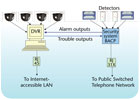
What’s Wrong with This?
Wally ‘Larman installed a burglary system with remote video look-in for a commercial account that required a UL central station certificate with line security. Wally used only equipment that was listed by UL and properly installed sufficient devices to meet the extent of protection required. He connected the BACP digital dialer to the Public Switched Telephone Network, connected the DVR to the customer’s Internet-accessible LAN and wired the alarm outputs of the BACP to the DVR as shown in this diagram. When Wally tested the system, everything worked as he expected, but when the UL inspector checked the system, he issued a violation. Can you see what Wally did wrong and what he must do to correct the problem?5-Minute Tech Quiz Answers
Here are the answers to the 5-Minute Tech Quiz and What’s Wrong with This? that appears on page 47.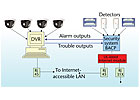
Answer to: What’s Wrong with This?
Wally’s problem is caused by using the PSTN as the sole means of communication for the burglar alarm system. A digital dialer can be used for a UL central station system, but it does not qualify for either standard or encryption line security. Wally must install some other communications device, such as Internet or radio that is listed by UL for line security. Since his customer already has an Internet-connected network, Wally can install a listed Internet module in the control as shown in this diagram. Modules are available that are listed by UL and can convert almost any digital dialer format to a data stream that can be transmitted over the Internet, providing the supervision required for line security. Wally may be able to use the RJ-31X jack he installed to provide a backup means of communication in the event that the broadband connection fails.Looking for a reprint of this article?
From high-res PDFs to custom plaques, order your copy today!


