New Routes for Alarm Signals

Cost savings for consumers don’t always translate in reverse, as central stations often have to pay more for the newer technology.
While dial-up communication between the control panel and the central station is still the norm, with estimates putting usage of this technology at about 90 percent, new telecommunication technology is entering the market—and each technology requires a technician be versed in installation differences. Driven by government action, and shifts in technology, these new monitoring technologies are becoming a growing factor as backup alarm systems. In more limited instances, they are being used as the primary systems in areas where POTS lines are not feasible.
Industry suppliers have been busy generating digital cellular technology based on Global System for Mobile Communications (GSM) technology. GSM, which operates in the 900 MHz and 1800 range bands, is the most popular standard for mobile phones in the world and is used by more than two billion people worldwide.
There are some concerns that the technology needs to mature because most of the new products are less than a year old. Reginald Blakely, product manager for Monitronics Int’l Inc., Dallas, says: “GSM for alarm transmitters just recently came available. And, it is not as widespread as we would like. There are only a handful of companies that produce those types of transmitters, and not all of the transmitters are compatible with all security systems.”
Manufacturers including Honeywell Security, Tyco’s DSC unit, AES-IntelliNet Corp., and others have released new products that will not only meet the AMPS Sunset Clause deadline, but also will offer enhanced technology. Honeywell and Tyco, for instance, offer GSM technology that use General Packet Radio Service (GPRS), which is a dedicated wireless data network operated by wireless carriers, and the Internet. AES-IntelliNet’s wireless-to-Internet system enables central stations to offer two-way radio transmission wireless alarm communications to customers in multiple geographic regions. Telguard Digital UL-listed model TG-1 is ideal for VoIP, cell-only or no-phone-line households.
Today, as cellular coverage has expanded nationwide, Blakely thinks that this technology is the best and easiest option for alarm transmission because it is easy to install and doesn’t depend on broadband service. A wireless system can be mounted on the wall right next to the panel. Much like a cellular phone, the unit must be programmed with the assigned phone number. From there, it is a matter of getting an output from the burglary panel to trip the cellular phone. This output is often the absence of a dial tone going into the cellular radio. When the panel attempts to make a call by a dial tone phone line, and no dial tone is detected, the cellular system dials out to the central station.
If cellular does have a down side, it is cost. Much like a purchasing a traditional mobile phone with either a large upfront cost or a long-term contract, the scenario for a cellular-type alarm transmitter is much the same. The cellular radio involves the installing company to have the transport service contracted with a third party, such as Alarmnet or Uplink, reminds Dale Bonifas, vice president of operations at Alarm Detection Systems, Aurora, Ill. The installation requires training for the technicians to install the radio and antennas and working with the third party to activate the monitoring, he says.

The Internet requires fixed IP addresses for the panel, and often the installer must work with IT personnel to get past firewalls that the user may have set up. In this case, the installer must use a Cat 5 or higher cable to connect the panel through the Internet to the central station.
An advantage of Internet transmission is its ability to connect and quickly upload a complicated panel setup. “Dial-up may take 20 minutes,” says Rick Raper, central station manager at Alarm Detection Systems. “This does it in five minutes or less.” This can be an important attribute, especially in complex applications with thousands of codes or during a walk-through test.
In the home, Blakely adds that broadband Internet services are the most difficult to install because the control panel is usually in a closet or out-of-the-way location; whereas, the computer is often in a family room or a bedroom and it is sometimes difficult to run the Cat 5 cable to the IP port.
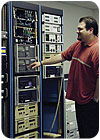
Central station monitoring centers need to have different receiving equipment that is compatible with different alarm signal transmissions, such as this equipment at Infinity Monitoring Services Inc., Elk Grove Village, Ill.
With a radio, some programming is required, but it is recommended that the programming occur at the central station before the installer visits the site, “so when the installer gets there, they just need to stick it on the wall,” Raper says. There are times when the structure of a building will affect the signal and the installer may need to run an antenna up on the roof or another locale.
Many of these changes require central stations to obtain new receivers to match the output of the control panels. “In some cases, you obviously will have to buy new receiving equipment that can accept signals through the Internet or through some sort of cellular communication,” says Anita Ostrowski, assistant west region central station manager for Vector Security Inc., Pittsburgh.
Bonifas’ company also uses AES-IntelliNet radio and he says that this technology uses both radio transmission systems and the Internet. The AES-IntelliNet technology is a wireless mesh network that allows signals to take multiple paths. It uses two-way smart transceivers for communicating data between remote locations and the central station receiver. “The radio transmission systems use a specially assigned radio frequency and a network of computers and transmitters to transmit alarm signals,” Bonifas explains.
Looking for a reprint of this article?
From high-res PDFs to custom plaques, order your copy today!


