SDMmag logo
search
Go to Ask SDM AI
cart
facebook twitter linkedin youtube
  • Sign In
  • Create Account
  • Sign Out
  • My Account
SDMmag logo
  • NEWS
  • PRODUCTS
  • TOPICS
    • Access Control & Identification
    • Integration & Network Solutions
    • Life Safety & Fire Alarm
    • Monitoring
    • Smart Home
    • Trends & Industry Issues
    • Video Solutions
  • COLUMNS
    • Digital Shuffle
    • Editor's Angle
    • Insider News & Business
    • Integration Spotlight
    • Marketing Madmen
    • Security & the Law
    • Security Comings & Goings
    • Security Networkings
    • Technology @ Work
    • Technology Solutions & Skills
    • SIA Waypoints
    • Cybersecurity Chronicle
  • EXCLUSIVES
    • Annual Industry Forecast
    • Dealer of the Year
    • Project of the Year
    • SDM 100
    • State of the Market Series
    • Systems Integrator of the Year
    • Top Systems Integrator Report
    • TMA Excellence Awards
  • BLOG
  • MEDIA
    • Videos
    • Podcasts
    • Polls
    • White Papers
  • EVENTS
    • Industry Calendar
    • Webinars
  • MORE
    • Classified Ads
    • Newsletters
    • SDM Store
    • State of Security eBook
    • Sponsored Insights
  • BUYERS GUIDE
    • Buyers Guide
    • Take a Tour
  • EMAG
    • eMagazine
    • Archive Issues
    • Monitoring Today
    • Advertise
  • SIGN UP!
Industry Innovations

Products

DMP Keypad Introduces System Panics

VK_iPhoneX_Mockup_SystemPanic_Resi
August 24, 2020

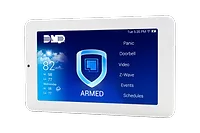
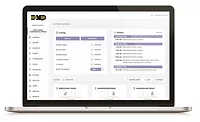
Customers can use virtual keypad if they ever need to trigger a system panic. Now the app, as well as VirtualKeypad.com, can display police, emergency and fire panics in the menu, and all users need to do is add it to customers’ app user in Dealer Admin. To enable customers’ system panic feature, Dealer Admin Version 2.40.0 allows you to go to the app user section where you can select the panic options to give to your customer. Depending on what they need or what you want them to have, you’ll check the appropriate boxes. When they log in to their Virtual Keypad app or website account, they’ll see “Panic” displayed in their menu. To initiate a panic, simply tap “Panic,” then press and hold the desired panic option for three seconds. Virtual Keypad continues to expand, giving customers more functionality and flexibility than ever before.

DMP | www.dmp.com

Looking for quick answers on security topics? Try Ask SDM, our new smart AI search tool. Ask SDM →

KEYWORDS: Panic button security apps security integrator

Share This Story

Looking for a reprint of this article?
From high-res PDFs to custom plaques, order your copy today!


Recommended Content

JOIN TODAY
to unlock your recommendations.

Already have an account? Sign In

  • SDM 100

    SDM 100: Top 100 Security Dealers of 2026

    The top 100 security dealers navigated a complex...
    SDM 100 Report
    By: Karyn Hodgson
  • Security camera

    State of the Market: Video Surveillance

    As video surveillance shifts from siloed systems to...
    State of the Market Series
    By: Brianna Wilson
  • 2026 Industry Forecast

    SDM 2026 INDUSTRY FORECAST

    Rapid technology advances meet shifting economic...
    Annual Industry Forecast
    By: Karyn Hodgson
Manage My Account
  • SDM Newsletters
  • Online Registration
  • eMagazine Subscriptions
  • Subscription Customer Service
  • Manage My Preferences

More Videos

Sponsored Content

Sponsored Content is a special paid section where industry companies provide high quality, objective, non-commercial content around topics of interest to the SDM audience. All Sponsored Content is supplied by the advertising company and any opinions expressed in this article are those of the author and not necessarily reflect the views of SDM or its parent company, BNP Media. Interested in participating in our Sponsored Content section? Contact your local rep!

close
  • Doctor examining child patient with mother present in medical clinic
    Sponsored byHID

    The Human Side of Hospital Security: How Modern Visitor Management Protects People First

Popular Stories

Video surveillance camera

Why Video Health Monitoring Is a ‘No Brainer’

ESA Board of Directors Q2 26 Elections

Electronic Security Association Announces 2026 Board of Directors Election Results

TMA & SDM Logos

Becklar, Elite & Puget Win 2026 TMA/SDM Monitoring Center Excellence Awards

SDM Dealer of the Year 2026 Promotion

Poll

What’s the most promising trend in the industry?

What’s the most promising trend in the industry?
View Results Poll Archive

Products

Physical Security Assessment Handbook An Insider’s Guide to Securing a Business

Physical Security Assessment Handbook An Insider’s Guide to Securing a Business

See More Products
SDM 100 2026 Rankings

Related Articles

  • DMP Keypad.png

    DMP Keypad Loads Up on Features

    See More
  • 7463ThinlineNetworkKeypad_001

    DMP Keypad Plugs In to Existing Network

    See More
  • DMP Virtual Keypad Access

    DMP’S Virtual Keypad Access Offers Control From Anywhere

    See More

Related Products

See More Products
  • Physical Security and Safety: A Field Guide for the Practitioner

  • Physical Layer Security in Wireless Communications

  • 9780815378068.jpg

    Biometrics, Crime and Security

See More Products
×

Be in the forefront of security intelligence when you receive SDM.

Join over 10,000+ professionals when you subscribe today.

SIGN UP TODAY!
  • RESOURCES
    • Advertise
    • Contact Us
    • Directories
    • Store
    • Want More
  • SIGN UP TODAY
    • Create Account
    • eMagazine
    • Newsletter
    • Customer Service
    • Manage Preferences
  • SERVICES
    • Marketing Services
    • Reprints
    • Market Research
    • List Rental
    • Survey/Respondent Access
  • STAY CONNECTED
    • LinkedIn
    • Facebook
    • YouTube
    • X (Twitter)
  • PRIVACY
    • PRIVACY POLICY
    • TERMS & CONDITIONS
    • DO NOT SELL MY PERSONAL INFORMATION
    • PRIVACY REQUEST
    • ACCESSIBILITY

Copyright ©2026. All Rights Reserved BNP Media, Inc. and BNP Media II, LLC.

Design, CMS, Hosting & Web Development :: ePublishing