Image Clarity Requires More Than Resolution Alone
Every image matters in a security application. Multiple factors go into achieving a clear and detailed image from a surveillance camera and higher resolution is not always essential to the effort.
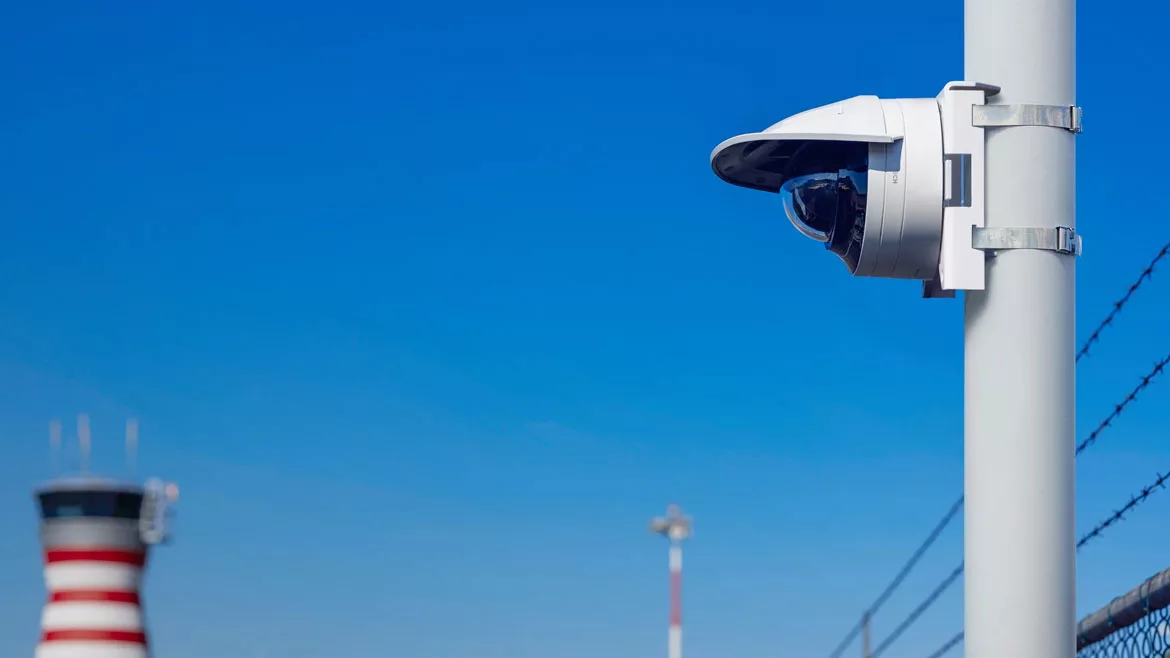
With the latest imaging technologies for low light and high dynamic range, the FLEXIDOME camera delivers color detail without blur and artefacts that result from object movement. Outdoor models have a robust water and dust-resistant design and a vandal-resistant housing that includes a dual-layer coating for corrosion protection. Image courtesy of Bosch Security & Safety Systems
The decreasing cost of high-resolution cameras makes them more affordable for common video surveillance applications. However, their improved affordability doesn’t mean security integrators should choose a high-megapixel camera for every installation, without regard to the other elements that comprise a well-defined image.
Factors such as the surveillance objective (whether the user wants to detect, recognize or identify), field of view, distance between camera and object, pixels on target, lighting conditions, camera sensor size, network impact and more, all shape camera choices. In actuality, a 2MP camera might produce a better overall image than a 4K camera under certain conditions.
Where Each Resolution Fits in the Market
Security integrators today have several go-to megapixel sizes that they use in security surveillance applications. Most common are 2MP, 5MP, and 4K (also known as 8MP) — the last one noted for gaining more traction in recent years. Of these, 2MP is most dominant in the market; and although its share has been diminishing of late, Darron Parker, executive vice president of sales at IDIS Americas, Coppell, Texas, doesn’t see 2MP “losing its crown anytime soon.”
Full-HD 2-megapixel technology has been used in security for more than 10 years. It is the most common camera size because of the vast number of applications for basic video surveillance. 2MP cameras work very well indoors — or on a smaller field-of-view outdoors — and in applications with controlled lighting and a relatively shorter distance to the target.
“2MP resolution traditionally provides the expected performance in image production, low light and wide dynamic range/high dynamic range performance at the right price point for many applications,” says Jim Kasperek, regional marketing manager – fixed cameras, Bosch Security and Safety Systems North America, Fairport, N.Y. “There is often greater compatibility with existing infrastructure, as well.”
We’re still seeing 2MP as a baseline, especially in cloud migrations where bandwidth is always a concern. Lower resolution often gets the job done easier and at a lower cost.
As an upgrade from analog camera technology, 2MP is likely much better than what the end user was previously using, notes Aaron Saks, director of sales enablement, Hanwha Vision America, Teaneck, N.J. “We’re still seeing 2MP as a baseline, especially in cloud migrations where bandwidth is always a concern. Lower resolution often gets the job done easier and at a lower cost,” he says.
2MP are the most affordable, are sufficient for short-distance applications and fit the needs of most end users who typically use them for general visibility. “With the use of AI and analytics, we are seeing growth in higher resolutions and other technologies to augment the physical security guard,” says Rui Barbosa, category manager for surveillance products, i-PRO Americas, Houston, Texas. “This enables them to monitor the system more effectively and respond proactively to emerging threats.
Looking for quick answers on security topics? Try Ask SDM, our new smart AI search tool. Ask SDM →
A big reason 2MP has relinquished some share, though, is because the cost of higher resolution cameras has dropped while their functionality and quality have risen. For example, 5MP cameras have become second most common after 2MP, Parker says. “All the things that 2 megapixels don’t do is why you would go to a 5 megapixel — larger field of view, larger distances; you’re looking for higher pixel per foot or pixels on target, your lighting conditions, you’re using that digital zoom.”
Parker sees that 5MP cameras are capturing some of the 2MP camera share. “But 4K as it has come down is taking a lot of the 5MP space.
“The reality is when you’re looking for distance and recognition and identification, often you went with 5MP, because for a long time that was the only really commercially available size,” Parker continues. “Then when 4K first came out it was expensive, so you were very selective about where you were going to deploy that. But as the prices have come down, people are in a better position to say, ‘It’s still going to cost me a little more, but I think the benefits are worth it.’”
Although the 2MP camera serves as a base level for most applications, there is a growing trend towards adopting 5MP cameras, particularly for outdoor deployments where higher detail is needed, says Steve Burdet, manager, solutions management, Axis Communications, Chelmsford, Mass.
“4K resolution is also popular, though it’s typically reserved for specific use cases where the higher resolution is justified,” Burdet says. “The same is true for resolutions above 4K, although with a sharper drop-off in adoption. For instance, while stadiums may use a small number of ultra-high-resolution cameras, the majority of cameras deployed are 4K or lower.”


A shift towards larger networks that provide more storage and upgraded bandwidth is one of the drivers of increased use of higher-resolution cameras in mainstream installations, Saks says, noting a pronounced transition towards 4MP, 5MP and even 6MP cameras. He says 4K cameras are also widely deployed, but are often viewed as specialty devices for uses requiring higher detail or a wider field of view.
“2MP resolution is still a significant percentage of most applications,” Kasperek says. “However, as networks have upgraded and improved and storage costs have come down over the last two to three years, there has been a noticeable shift to higher megapixel cameras — mostly 4MP and 5MP, with 8MP on the rise,” he adds.
4K (8MP) is the highest resolution available at a reasonable relative cost, Barbosa describes, pointing to uses such as wide-angle views of large areas. “Most importantly, having a 4K sensor allows operators to zoom in without losing critical details, since 4K is effectively four times HD. Zooming in on lower-resolution images pixelates much more easily,” he says.
Yes or No: Higher Resolution Equals Better Detail?
Higher resolution does not necessarily produce better detail unless other elements are in place, too. There are a vast number of factors that go into making an effective image.
“Technically, yes, higher MP means more pixels and more pixels can mean better detail,” says Todd Keller, president of Speco Technologies, Amityville, N.Y. “But in practice, image clarity depends on a lot more than just resolution. If a high-megapixel camera has a small sensor or poor lens, it might produce a worse image than a lower-resolution model with better optics.”
Other determining factors are lighting, compression and bandwidth, Keller says. “A 4K camera on a limited network might be streaming in low quality due to restrictions, giving you a blurry image anyway.”
In general, higher resolution does offer the best performance, Burdet says. However, the conditions need to be ideal: perfect lighting, slow-moving objects, and reasonable distances.
Technically, yes, higher MP means more pixels and more pixels can mean better detail, but in practice, image clarity depends on a lot more than just resolution. If a high-megapixel camera has a small sensor or poor lens, it might produce a worse image than a lower-resolution model with better optics.
He explains, “When considering the [first] two factors in combination with distance, you will need to have sufficient light sources further out (as low light will be more pronounced the further away the target is) and the faster the object will mean the harder to capture. In lower light the device will lengthen its shutter speed, which creates a blurry fast-moving object. In higher light, it will shorten the shutter speed, which can be great for capturing fast objects,” Burdet says.
Higher resolution generally means more detail. But as pixel count rises, individual pixel size shrinks, reducing the light they receive. This can impact low-light performance, making lower-resolution cameras a better choice in some cases such as nighttime viewing, Saks says. Newer cameras often have larger sensors, which allow for more pixels without sacrificing pixel size. So, higher megapixels don’t always mean smaller pixels, as sensor size plays a key role.
“Look at your full cycle of use: daytime, nighttime, indoors and outdoors. You could have a camera that looks really great during the day, but not at night,” Saks advises.
Integrators also need to know how resolution is relative to field-of-view, Barbosa says. For example, a 2MP camera with a 20x zoom will put more pixels on target than a 4K (8MP) camera with a 1x zoom at the same distance.
“Higher resolutions are also unnecessary in some scenarios, such as license plate recognition or face detection,” Barbosa says. “Proper contrast, lighting and pixels per foot (PPF) can be equally, if not more, important when capturing critical characteristics.”

Using the Pixels per Foot Formula
A formula that security integrators can use to determine if a certain camera resolution will work for its intended purpose is called pixels per foot (PPF).
PPF is not complicated. Most manufacturers and other organizations offer PPF calculators, field of view calculators, field of view indicators within apps, and similar tools.
“Getting to that piece of information is not difficult — it’s foundational,” says Darron Parker at IDIS Americas. “But there are a lot of other pieces of the puzzle today as technology has advanced, especially with the introduction of analytics.”
However, the PPF formula is a solid starting point. It provides a measurable way to match camera resolution to real-world detail requirements, describes Todd Keller of Speco Technologies.
Keller says, in simple terms, PPF is calculated by taking the horizontal resolution of the camera and dividing it by the width of the area being covered. For example, if you plan to use a 1080p (1920 x 1080) resolution camera to monitor a 20-foot wide section, the formula is 1920 ÷ 20 = 96 PPF.
“The higher the PPF, the more detail you’ll capture in that area. For general monitoring, 30 to 50 PPF may be fine. If you’re looking for clearer details — like reading text on a sign or identifying what’s in someone’s hands — you’ll want to aim higher, around 80-plus PPF. It’s all about balancing detail with coverage,” Keller says.
A customer’s needs will greatly change the camera requirements based on what the goal of that camera is, says Aaron Saks of Hanwha Vision America. “You want to avoid overkill or buying too much camera for certain applications. So, there are standard guidelines for how many pixels per foot you need for each step of DORI: detect, observe, recognize, identify,” he says.
Rather than looking at pixels per foot, Steve Burdet of Axis Communications recommends measuring pixels on target, since a camera is often meant to monitor for something specific.
“Pixels on target refers to how many pixels are focused on the object you care about. More pixels on the target means more detail, helping you choose the right resolution and camera for the job. So, it’s important to ask, what is the camera intended to do? Whether it needs to detect, recognize, or identify the target will be a factor,” Burdet says.
For example, he says, if a camera is meant to detect a vehicle, a lower resolution or fewer pixels on the target would be sufficient, which in turn can give you the ability to see further, Burdet describes. “However, if the mission is to read a license plate (recognize or identify), then you will need higher pixels on target,” Burdet says.
Dynamics of Choosing the Right Resolution
Choosing the correct megapixel camera for any job involves knowing whether the end customer’s purpose is detection, observation, recognition or identification (DORI). This metric was adapted from the Johnson Criteria, which was developed in the 1950s for night vision systems.
DORI is used to evaluate a camera’s image quality and its capability of capturing details over various distances:
- Detection enables distinguishing the presence of a person or object without capturing finer details.
- Observation enables watching and capturing activity in a monitored area.
- Recognition enables establishing if an individual or object appears familiar based on general features.
- Identification enables capturing sufficient detail to verify identity.
These classifications — which sometimes are labeled differently among manufacturers — are based on the number of pixels necessary to perform each task. They can help security integrators gauge a camera’s potential effectiveness on the job based on the intended purpose.
“Each use case demands a different level of image clarity,” Burdet says.
Each use case demands a different level of image clarity.
In addition to resolution, another key piece of the image puzzle is coverage area. The larger the space, the higher the resolution the end customer might need — or even multiple cameras to maintain detail across the area. “Are we covering a loading dock, a hallway, or a parking lot? A tighter space may only need 2MP, while wide-open areas may benefit from 4MP or 8MP to minimize blind spots,” Keller says.
Lighting conditions also are a key factor. Higher megapixel cameras won’t have the desired effect if the lighting is poor. “Cameras with great low-light performance or IR capabilities will often outperform a high-megapixel model in a dim space,” Keller says.
He explains that larger sensors handle light better and help keep an image quality clean at higher resolutions. “I avoid pairing high megapixel with small sensors — it creates noisy or muddy images,” Keller cautions.
A wide field of view distributes pixels over a larger area, which can reduce detail unless resolution is upped. Using a higher megapixel camera in a wider area provides more pixels on image.
When calculating which camera resolution to use, two important considerations are the target size (smaller objects may require higher resolution to be captured clearly) and pixels on target/image, which is the number of pixels covering the object of interest. “More pixels mean more detail, which is critical for tasks like identification,” Burdet describes.
And, the longer the distance is between the object and the camera, the more resolution that may be needed to retain detail. One new factor to consider is fusing radar with visual cameras, he says.
“When distance is important, sometimes a camera simply might not able to achieve the objective in all scenarios,” Burdet says. “For example, seeing 180 feet with enough detail to recognize an object might require a narrower field of view and longer lenses to achieve. This means you will not cover as much area but can see further. Radar fusion helps address this limitation by using the radar to detect and overlay the object on the video feed, even when the camera would not be able to achieve that on its own. This type of solution can help alleviate the need for higher resolution.”
Lens choice and manipulating an image with zoom also play a role in camera selection, potentially affecting how the camera handles low light or extreme light, as well as motion in low light or fast motion scenes, Kasperek says.
“If using a CS or C mount style camera, the lens should match the imager format spec. The lens should also support the maximum resolution of the imager/camera. If IR illumination is required, the integrator should ensure the lens will properly support the use of IR. Use the manufacturer’s recommended lenses for a camera, as they are usually tested for maximum compatibility,” Kasperek advises.
Keller says the lens type (fixed or varifocal), aperture, IR range, and wide dynamic range all impact image quality. “You can have a high-res camera, but if the lens is narrow or the IR isn’t strong enough, you’re not getting the most out of it,” he says.
Fixed lens cameras, as a rule, aren’t capable of optical zoom — only digital zoom, Parker explains. “So if I’m covering a wider area and greater distance, and I want to zoom in — for recognition, identification, or situational awareness — then I want the maximum amount of resolution depending on what I’m trying to accomplish,” he says.
Parker gives an example: “If I have a 2MP camera and I’m looking 400 feet away and I zoom in, every one time, two times, four times zoom, I am cutting the resolution — meaning the picture becomes grainier. The ability to identify or even to recognize gets more and more clouded and it becomes a very, very fuzzy image. But if I have a 4K or an 8K resolution camera, I have a lot more flexibility to zoom in from an optical perspective because I’m going to maintain pixels on image,” he says.
All Things Considered
As 4K televisions have become standard, “it’s a given that higher resolution cameras will become more affordable and standardized over time,” Barbosa says. “The more pixels we can capture, the better we can ascertain crucial details. AI analytics accuracy is also enhanced with better resolution.”
Equally important, however, is the availability of sensors that can deliver accurate color and contrast in low light, while responding quickly to changes in lighting conditions, he says. “Resolution is just one of the many factors that must be considered when finding the right camera for the unique needs of an installation.”
The result of crunching all these pixels and examining all of the various factors that impact an image is to address the specific requirements of each job, says Kristen Plitt, vice president of marketing and sales development at IDIS Americas.
“There are a lot of conversations above and beyond what these formulas and factors mean,” she says. “We’re pulling all of this together for the customer based on what their application is and what their needs are, and we’re trying to help them also balance the cost of storage and the total cost of ownership of the system — to create a solution that meets the customer’s needs and solves their problems.”
IDIS’s Parker concludes that it’s all “because every image matters.”
Take Advantage of Manufacturers’ Tools & Resources
One of the many positives of megapixel cameras is the wide range of tools and resources available to security integrators and others in the professional security industry.
During the camera-selection process, Darron Parker of IDIS Americas says to keep in mind that manufacturers are “feature-loading” and then grouping cameras (think good, better, best) to simplify selection. They are emphasizing training and effective communication; and manufacturers are continually developing tools to aid the buying process so that the end customer will get exactly what they need.
“We as the manufacturing community put a lot of time, energy, effort and resources into supporting the groups who design systems like consultants and engineers; the groups that install, service and maintain systems like integrators,” he says. “We have a very cohesive relationship — they’re symbiotic — from training to product rollout, to feedback to president’s councils, to all of those things that ensure that our roadmap is effective, our communication is effective, our tools are simple.”
An example of some of the tools IDIS offers is a field-of-view selector that integrates with CAD drawings or Google Maps. “You can take a model of camera and drop it on and see exactly what the camera is going to see and what the field of view will be and all different settings,” Parker says.
Another is a camera selector tool that lets the integrator specify requirements such as indoor or outdoor, type of mount, resolution, and other specs and then narrow down the camera choices.
Speco Technologies has a variety of resources available through its Partner Portal, including resolution guides, lens calculators, and training decks. “If you’re working on a proposal or just want to brush up on best practices, reach out to your rep or our training team — we’re happy to help,” says Todd Keller at Speco.
Axis Communications has very rich blog and whitepaper sections on its site says Axis’ Steve Burdet
Rui Barbosa of i-PRO Americas says the company’s tools are used to help guide security integrators towards the best cameras for their job — whether that is detecting a human or vehicle, or identifying an individual, or reading a license plate. “For i-PRO specifically, our System Design Tool tells integrators if a camera is suitable for a specific scenario/analytic/etc. It’s used to assess the camera’s visual range based on what the customer wants to see or do,” he says.
Looking for a reprint of this article?
From high-res PDFs to custom plaques, order your copy today!