Ethernet LANs: Understanding Packet Data Transmission & Device Addressing
It is certainly possible to transmit a file in a complete stream from start to end from one computer to another. This type of transmission is often used when a system only transmits in one direction, from one device to another. Think about a typical analog CCTV setup, where one camera is connected to a single monitor. The camera sends its images in one uninterrupted stream, and the pictures are displayed on the monitor.
The situation becomes more complex when multiple communication devices, such as computers, are connected to a common cable or segment, and each device needs the capability to speak with all of the others. If files were sent from one computer to another in one uninterrupted stream, all of the other devices would be unable to communicate during that time period.
Because of these issues, Ethernet divides files to be transmitted into packets, which provide addressing, sequencing and other information, which allows the receiving network device to properly reassemble the file. These packets are also referred to as frames.
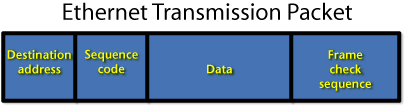
Ethernet Packet Format and Routing
The 802.3 standards specify how Ethernet packets are assembled for transmission. Let’s look at this simplified diagram.The Destination Address is the address to which the packets are going. For obvious reasons, this is placed at the beginning of the packet stream. The Transmitter’s Address is needed, so that the destination computer knows where to send receipts for packets and possibly requests for the resending of packets that were garbled during transmission.
The Sequence Code is the number of the packet within the overall file being sent. If a file has 567 packets in its transmission, the sequence code says that this is packet #324 of 567 total, for example.
The Data section is where the actual file’s packetized contents are located within the packet. This data field can be a minimum of 46 bytes or a maximum of 1500, with a byte being eight bits (1s and 0s).
The Frame Check Sequence provides an error correction mechanism to ensure that the complete packet arrived without error.
Looking for quick answers on security topics? Try Ask SDM, our new smart AI search tool. Ask SDM →
On large networks such as the Internet, the packets that contain a transmitted file may travel by various routes to get from one computer to another. As the packets travel, routers and switches read the destination address of the packet, and forward it along to its final destination. Routers and switches direct the packets to the fastest path available at the time the individual packets are received. If one path becomes busy with other traffic, the router may send a packet along another route.
Addressing of Devices
To facilitate communications, each device on an Ethernet network must be properly and uniquely addressed. Just as the telephone companies must issue phone numbers that are not duplicated, the manager of an Ethernet network must carefully program the computers and other devices on the network so that data transmissions can be transmitted and received from one to another.
Each Ethernet network device will have two addresses, a MAC (physical) and an IP (logical). MAC addresses are hard-coded into a device or product at the factory, and typically are never changed. IP addresses are settable and changeable, allowing networks to be configured and changed.
MAC Addressing
The Media Access Control (MAC) address provides a product serial number, or physical address, which is used to identify a particular device on a network. This is a hard address, which is implanted into the firmware of the product at the factory. In most cases this address cannot be changed by the user.Every device that can be connected to an Ethernet network will have a unique MAC address. Similarly, any network-enabled electronic security device also will be coded with its distinctive MAC. For example, the MAC address of a particular network camera is: 00-60-45-0D-56-EC
The MAC address is used on Ethernet networks to identify individual devices. When a file is transmitted, the data packets contain the MAC address of the recipient, and the assigned IP address.
Think of the MAC address as the Vehicle Identification Number (VIN) for your automobile or truck. This is a unique number identifying your particular vehicle, and no other car has the same number as yours.
IP Addressing
The address format that we are most concerned with for networking applications is the Internet Protocol (IP) address. This numeric code is settable and changeable, allowing the network administrator or installer the ability to modify settings to achieve proper communications.Current IP addresses are formatted into four groups of numbers, with a maximum of three characters in each group, called octets. There are no letters used in current IP addresses. A typical IP address for a computer on a network might be: 192.168.1.23
Any number in an IP octet must be between 1 and 254. So an address such as: 192.168.343.2 is invalid.
IP addresses are considered to be logical addresses, and they define what type of network the device is connected to, whether it is a local area network (LAN), wide area network (WAN), or the Internet. These distinctions are defined by using the same number set in the first; first and second; and first, second, and third octet fields.
Reuse and Default Addresses
If connected to separate networks, devices often have identical IP addresses. The common form of IP addressing for LAN devices is in the format of 192.168.0.XXX or 192.168.1.XXX, with the Xs providing up to 254 distinct addresses for devices. While there may be literally millions of network devices with the address 192.168.1.1, because they are each on unique LANs, there is no conflict in addressing or communications.Electronic security network devices are generally shipped with a pre-programmed default IP address. This enables communications to and from that particular device.
To allow communication between devices on a local network, the IP addresses of each connected computer must be programmed the same for the first three octets of the address string.
Looking for a reprint of this article?
From high-res PDFs to custom plaques, order your copy today!


