Control with a Flair
Touchscreens and keypads give alarm systems their pizzazz! New advances include graphical interfaces, new ways to communicate and simplified installation.
Keypads and touchscreens can make or break an alarm system sale, and technology advances in this area are raising the bar, supporting a range of new capabilities — from more intuitive user interfaces to RFID communications.
|
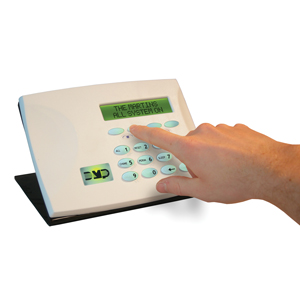
| DMP offers a keypad for its wireless system that doesn’t require a hardwire connection to the control panel, saving installers time and making for a neater installation process. |
The alarm industry often benefits from advances in other industries such as mobile communications, where higher product volumes drive greater economies of scale. Nowhere is this more true than in touchscreen technology.
“The technology of touchscreens has advanced,” explains Tom Mechler, product marketing manager for Fairport, N.Y.-based Bosch Security Systems. “The clarity and brightness makes it easier for end-users that might be getting older to see and use touchscreens. We’ve been able to take advantage of developments in adjacent industries to provide better products for our customers.”
As Mechler explains, touchscreens use virtual buttons in place of the hardware buttons used on traditional alarm keypads, and the functionality of the virtual button changes as users move through various steps in controlling their systems. An important advantage of this approach, he says, is that it can reduce false alarms.
“A significant number of false alarms are due to the end-user not being familiar with the system and making mistakes,” Mechler says. “A touchscreen adds the ability to use menus to drive through functions and help screens.”
The use of touchscreens also can help unlock powerful new applications, notes Robert Puric, director of product marketing for Melville, N.Y.-based Honeywell Security. “For the longest time the security system has held a unique position in the home,” he explains. “It knows what’s going on in the perimeter and in the home.” That capability makes the security system ideal for managing home automation and energy control, but traditional keypad interfaces with two or four lines of 16 characters limited how the security system could be used.
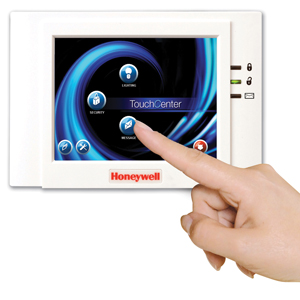
Although touchscreens have been available on high-end home automation systems for several years, cost decreases driven by other industries now make it more practical to use touchscreens on mainstream systems, Puric says. Unlike traditional alarm keypads, touchscreens can support graphics as well as text, which gives them the ability to graphically depict a user’s home, simplifying tasks such as controlling specific lights and thermostats in the home.
Graphics capability also can enable touchscreens to support other new capabilities that aren’t system-related. Honeywell, for example, offers a keypad that displays a selection of family photos when not in use for system control. Homeowners can load photos into the touchscreen by using a SIM card. Moving forward, Honeywell also plans to offer touchscreens that will accept Internet photo uploads from personal computers or mobile data devices, enabling end-users to do their own uploads as well as giving dealers the option of offering a photo upload service.
Looking for quick answers on security topics? Try Ask SDM, our new smart AI search tool. Ask SDM →
Alarm equipment manufacturers also are beginning to use touchscreens as a means of sending promotional announcements, reminders to schedule service calls or other information to their customers. Melville, N.Y.-based Risco Group offers touchscreens that can receive this type of information over a range of connection types, including a traditional phone line or an IP connection. Security company personnel can send the messages using the same software they use to remotely program the system, which can save time in comparison with placing phone calls to customers. In addition, “you know they get the message,” notes David Radabaugh, regional sales manager for Risco Group.
And just as touchscreens can make life easier for consumers, they also are easier to use for installers. Prompts and graphics on touchscreen displays can help step installers through the programming process, minimizing training and installation time and helping to ensure that installations are done properly the first time.
ADD-ONS & UPGRADES
Some manufacturers also offer optional upgrades or add-ons for their touchscreens to support added functionality. Risco Group, for example, offers a microphone and speaker for use with its touchscreen, enabling family members to record and playback messages to one another and essentially providing a modern-day alternative to a message board.
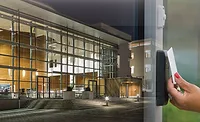
Risco Group and some other manufacturers also have touchscreens and keypads with built-in RFID capability, enabling end-users to use a proximity card or keyfob instead of or in addition to a code to arm and disarm a system.
|
| Touchscreens such as this one from Honeywell can help prevent false alarms by offering a simplified user interface. |
This capability can add an extra level of convenience for consumers by eliminating the need for them to remember codes and can help differentiate a dealer’s offering from competitors, Radabaugh comments. And in commercial applications, the Risco RFID-enabled touchscreen, in combination with a Risco panel, can support access control system logging, potentially eliminating the need for a separate access control system.
When a touchscreen has broadband network connectivity, whether cellular or through a landline connection such as DSL or a cable modem, it also opens up the possibility of using the touchscreen to display vital information such as weather, stock reports, news and sports. Security equipment manufacturer Interlogix, a unit of UTC Fire & Security’s Global Security Products business headquartered in Bradenton, Fla., offers this capability as an optional add-on for some of its touchscreens when used with certain Interlogix control panels.
Interlogix panels with a GSM cellular connection can provide this capability through a partnership with Vienna, Va.-based Alarm.com, which provides a content feed over the GSM link, explains Justin Luber, product marketing manager for Interlogix. The control panel communicates the information to the touchscreen using a short-range wireless communications technology that is proprietary to Interlogix.
Alternatively, Interlogix panels that support landline broadband connectivity such as DSL or cable can receive information feeds from another Interlogix partner, iControl Networks of Austin, Texas, Luber says. In that case, communication between the panel and the touchscreen occurs over a Wi-Fi connection.
Alarm.com and iControl also offer a service that lets end-users view video images from cameras located inside or outside of their homes on Interlogix touchscreens. Both Interlogix partners bill dealers on a monthly basis for services such as these. Dealers can then establish their own monthly rates for their customers.
Honeywell is working on making similar capabilities available to its dealers through its AlarmNet unit.
A HINT OF THINGS TO COME
More innovations in keypads and touchscreens are on the way. For example, DMP is working on its first touchscreen for release later this year.
Meanwhile, Mechler at Bosch Security Systems says advances in processor technology will make it possible to add a higher level of intelligence to the control panel, thereby minimizing the intelligence required in edge devices such as keypads — an approach he says Bosch is pursuing for future system designs.
| New Approach to Wireless Enhances Keypads |
|
In alarm systems that use wireless communications within the customer premises, the keypad traditionally has been the one element of the system that still needs to be connected to the control panel. But Springfield, Mo.-based manufacturer Digital Monitoring Products (DMP) recently introduced a keypad that does not require a hardwired connection to the panel.
As Mark Hillenburg, product architect for DMP explains, this is made possible by the 900 MHz spread spectrum technology that DMP uses, which supports two-way wireless communications.
|
Looking for a reprint of this article?
From high-res PDFs to custom plaques, order your copy today!