Innovations in Wireless Access

Wide Range of Connection Options
PCSC, based in Torrance, Calif., leads the field in terms of the different types of technologies available to connect the company’s access control panels to each other and to a client’s network. While offering traditional RS-485 and TCP/IP wired connectivity, PCSC’s panels can alternatively communicate wirelessly using either the 802.11b Wi-Fi or 802.15.4 Zigbee Pro technologies.
Because many client networks already include Wi-Fi access points, the advantage of connecting the PCSC panels using this technology is obvious. Access panels can be placed anywhere there is Wi-Fi coverage, and the device can be programmed to act as an IP-addressed node on the network. Wi-Fi coverage can be tested using a Wi-Fi equipped laptop computer or a purpose-built Wi-Fi tester, and the PCSC products support all of the standard encryption protocols such as WEP, WPA, and WPA2. High security can be achieved using the 256-bit Rijndael AES protocol included in PCSC’s Wi-Fi controllers.
The Zigbee Pro PCSC option uses the 802.15.4 IEEE standard to provide potentially longer transmission distances with reduced power requirements compared with Wi-Fi connectivity. There are two primary advantages to using Zig-bee Pro. First, the devices can be configured to operate as a “mesh” network, so each controller can not only report its own communications, but also can pass through other controllers’ signals to the rest of the network. The second and most important benefit of Zigbee Pro is that it can be installed as a completely separate wireless network just to handle access control communications. This keeps client employees from using their network-connected desktop or laptop computers to accidentally or purposefully reach the Zigbee Pro equipped access panels, which is very possible when Wi-Fi or Ethernet connected access panels are placed on an enterprise network.
It’s important to note that the PCSC access panels can be installed in a blended manner, with some being wired to the Ethernet network while others use one of the two available wireless capabilities. This flexibility of communication gives security integrators the ability to plan the most functional and cost-effective installation, using wired devices where Ethernet is available and wireless where it makes sense.
Wireless Door Locks Use Spread Spectrum Technology
The debate within the electronic security industry continues: Should access control systems be connected to the client’s enterprise Ethernet and Wi-Fi network, or should the system communicate via a separate path? While there are good arguments on both sides of this issue, it is difficult to debate against the logic that a separate communications method is more secure than sharing the bandwidth with local enterprise users.
Novation Wireless Security Systems LLC, with headquarters in Westlake Village, Calif., is producing an attractive line of wireless door locks and interfacing devices that communicate using a proprietary protocol in the 902-928 MHz range. Utilizing proven Spread Spectrum technology, Novation’s “nSeries” family of products provides typical RF communication distances of 500 feet.
Here’s how it works. For traditional access control arrangements, an “nPort” allows the connection of a typical card reader, request-to-exit device, door monitor contact, and door locking hardware. Wireless doors locks (“nLocks”), which include a 125 Khz proximity card reader and optional keypad, can be installed very quickly in existing or new doors. For other input/output requirements the “nPort I/O” controller can be used to connect alarm relays, push buttons, or other devices that can be used to trigger outputs to turn on lights, open a gate, and such.
The devices listed above communicate with an “nHub,” which communicates to a customer’s PC to operate the access control system. Novation’s software supports both Windows XP and Windows Vista operating systems.
So what’s great about this Novation system? Separate connectivity can provide a key security advantage over those systems that connect to the common network. If the client’s enterprise network falters, a connected access system may have to operate in a “degraded” mode until network functionality is restored. Because the Novation products do not need the enterprise network to communicate, they are relatively immune to such potential problems.
Looking for quick answers on security topics? Try Ask SDM, our new smart AI search tool. Ask SDM →
Wireless Transmitter Works Like an Access Card
One application for access control is often problematic: how can end-users easily open outdoor gates, parking garages, and activate other security features such as outdoor lighting from inside their vehicles. For convenience and personal safety, the optimal solution is a wireless transmitter. One problem with wireless transmitters is there generally is no provision for allowing or disallowing activations based on the user, day of the week or time.
What would solve this problem is a wireless transmitter that thinks it’s an access control card, and a receiver that acts like a card reader.
Viscount Communication and Control Systems Inc., headquartered in Burnaby, British Columbia, is delivering a system that turns wireless keyfobs into access control cards. The “RadioClik” receiver wires just like a card access reader, providing a 26-bit Wiegand output to an access control panel. Individual keyfobs are factory-programmed with their specific Weigand site code and device number. More than a million different transmitter codes are available. Keyfobs can be purchased with one, two, or three buttons, with each button providing a separate and unique access code. Because of the unique coding, keyfobs can be enrolled onto an access control system, which can be programmed to allow/disallow the activations of the individual device based on time, day of the week, authorization levels, etc.
With a three-button RadioClik keyfob, a user can drive up to the main gate, press button number 1, and the gate opens. Pressing button number 2 can turn on the parking lot lights, and button number 3 can activate a motorized overhead door.
It’s important to note that when using the two- or three-button keyfobs, the system can be configured so that the individual activation buttons can communicate with a single or multiple RadioClik receivers. Think of each button as its own access control card; the wireless keyfobs can communicate to many different Viscount wireless receivers connected to the same access control system.
Wireless Transceivers Feature Built-in Testing Function
If you are planning to install a wireless access control panel in a client’s location, how do you know the device will work where you need to put the box?
Keri Systems, San Jose, Calif., has delivered an innovative series of wireless access control transceivers with built-in testing capability. The Keri KWX wireless transceivers will connect to any Keri PXL-500 Tiger II controllers and/or EntraGuard telephone entry panels. Utilizing either 915 Mhz or 2.4 Ghz, these transceivers provide wireless RS-485 communications, effectively eliminating the need for copper cabling between controller panels. With wireless ranges from 55 meters (2.4 Ghz) to 90 meters (915 Mhz), the Keri KWX devices provide great flexibility for wireless access applications.
Transceivers can be used in a mix-and-match format, using the best technology for each application, and the transceivers can be wired up to 100 feet from the controller, allowing installers to place the transceiver where it has the best wireless functionality.
How can you test for point-to-point wireless functionality? Just use the units themselves. Take one KWX device, attach a battery, turn it on in the test mode, and place that unit at one location. This device is now sending out a sample controller stream. Take another KWX device, hook up a battery, make sure the test switch is off, and look at the green strength LEDs. Take this second unit to where you are planning to have an access control panel, and look at the green LEDs again. If one or more of the LEDs is lit, you are in business.
The Keri KWX product series with built-in signal strength indicators provides a positive testing method for the installation of wireless access control communications.
Door Locks/Access Control Readers Are Wi-Fi Enabled
An exciting new option for networked access control is the advent of Wi-Fi-enabled combination door locks/access control readers.
Consider the installation of a typical access-controlled system on a door. The installation will require a door strike or magnetic lock, a card reader, a door position switch, and a request-to-exit (REX) device, along with panic hardware. All of the electronic devices need to be wired to an access control panel, which must have backup battery power.
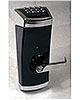
Compare this to a new line of access-controlled door locks from SARGENT, New Haven, Conn., an ASSA ABLOY Group brand. The SARGENT Profile Series v. S2 locks combine the options of a proximity card reader, keypad, and brass keyway entry into a single door lock that can be connected to the LAN via wireless 802.11b/g Wi-Fi.
The v.S2 electronic locks eliminate the need for an electric strike or magnetic lock installation, along with associated cabling, power supplies, and backup batteries. The person operating the door handle, after gaining access via their keypad code, proximity card, or key, provides the power that operates the lock. The v.S2 locks also can eliminate the need for the REX and door position switches traditionally required.
These locks simplify the installation of networked access control on doors, and they can combine access requirements for high-security applications so that the user must provide something they have (the proximity card) with something they know (the keypad code).
The ability of the SARGENT Profile Series v.S2 locks to communicate with existing wireless 802.11b/g Wi-Fi LAN access points makes for truly wireless access control.
TECH TIP
If planning to connect any device to a client’s existing Wi-Fi access point (AP), whatever encryption is programmed into the access point must be exactly matched in the remote device. It is not possible to set up one device with one encryption method, while other devices are using a different encryption protocol, when all devices are communicating to the exact same Wi-Fi AP. It’s the AP that determines the level and type of encryption.TECH TIP
Many vendors provide media converters that will convert serial protocols such as RS-232, RS-422, and RS-485 into Ethernet packets which then can be transmitted over typical networks; so the Novation system can be readily connected to a common enterprise network if desired. Check with Novation at novwireless.com to confirm which media converters the company recommends. Some general suppliers of these converters are: Black Box and B & B Electric.TECH TIP
Weigand readers and devices have a cabling distance limitation of 500 feet from an access control panel to the reader/device. Be sure to use high-quality cable that is specifically manufactured for Weigand readers; cheap cable may produce problems, particularly on long cable runs.TECH TIP
Radio frequency devices and technologies will be rated for a specific maximum distance, as explained above. The distance that wireless signals can be reliably communicated is a function of the power of the transmitter, the sensitivity of the receiver, and any path obstructions, metal or otherwise, that exist between two transceivers. A radio path might be functional one day, but blocked the next by changes a client makes to the environment.
While each technology will have a rated maximum distance, that distance usually is reached by using the standard omni-directional stick antenna that is supplied with the basic unit. Installers can use extended-range omni-directional or unidirectional Yagi antennas to increase the range beyond the rated maximum distance. Having the optional antennas readily available might save hours of repositioning and retesting a balky transceiver.
Editor's Note
Look for more innovations in upcoming issues of SDM. Did you find this article useful? Please let us know by calling or writing to SDM at (630) 694-4027, e-mail stepanekl@bnpmedia.comLinks
Looking for a reprint of this article?
From high-res PDFs to custom plaques, order your copy today!



